
Why This Tool Exists
The Palantir platform can be overwhelming to newcomers. The range of possible use cases is broad, no-code and pro-code paths coexist, and an unfamiliar design model like Ontology sits on top of all of it. That’s why the same question keeps coming up: “How do I build X in Foundry?”
The problem is there’s no single decision chart that answers that question. The right answer depends on variables like build frequency, data types, and when computation happens — and beginners don’t even know what to consider in the first place.
Palantir’s Forward Deployed Engineers (FDEs) kept seeing the same frustration play out in the field: developers whiteboarding a solution and getting stuck. Whiteboards are flexible, but that flexibility invites vagueness, and rarely produces a clean design that the whole team understands the same way. Solution Designer was built as the answer to that problem — in short, “a Foundry whiteboard that knows what’s possible.”
What Solution Designer Does
Solution Designer is an interactive tool for visually representing the architecture of a solution built on the Palantir platform. It represents both first-party and third-party integration points, links directly to platform resources, and gives you on-demand access to documentation and best practices.
The key idea is that it’s built to compose a solution architecture in an easy graph interface, drawing on a library of components and implementation patterns. You can get started without needing to already know Ontology, Actions, or Functions.
Core Features
- Reference architecture library: Draw inspiration from a collection of pre-built industry and technical patterns as a starting point.
- Node-based diagrams: Built from four node types.
- Component nodes: Represent Foundry platform tools themselves, like Pipeline Builder or Workshop.
- Resource nodes: Link directly to real Foundry resources — Datasets, Object Types, Functions, Actions.
- Concept nodes: Represent an abstract workflow like “data sourcing,” which you can refine into a concrete implementation using AIP Architect.
- Text nodes: Add annotations and notes directly on the canvas.
- Grouping: Consolidate related nodes into logical containers to keep larger diagrams organized.
- AI-powered review: Get AI analysis and recommendations on your architecture via AIP Critic.
- Documentation and sharing: Add comments or descriptions to each node and link, then export as PDF, image, or JSON to share with stakeholders or use for team onboarding.
- Data Lineage integration: Load existing data flow graphs to add architectural context.
AIP Architect — From Requirements to an Implementation Plan
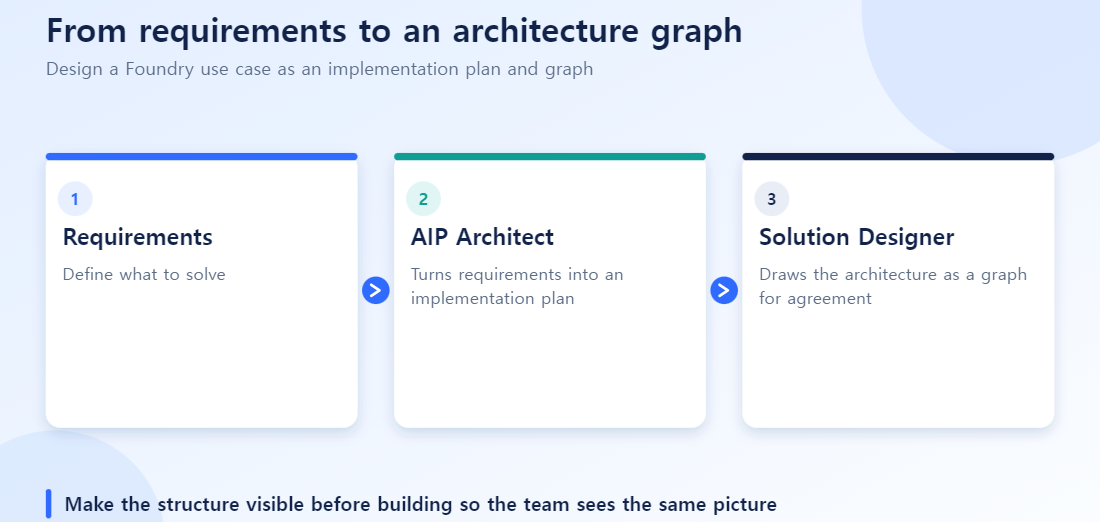
AIP Architect is an AI feature built into Solution Designer that uses an LLM to turn workflow requirements into a step-by-step implementation plan.
Here’s how it works: you provide requirements — the problem to solve, constraints, desired outputs — and AIP Architect generates a visual workflow graph showing how the components fit together. It comes with AI-generated context explaining why a given pattern fits, what components are included, and what the trade-offs are.
The Ontology node feature is especially useful in practice. Describe the data structure you want, and AIP Architect will generate a set of Object Types, Object Type Properties, and Link Types directly on the graph. Instead of designing an ontology from a blank page, you start by reviewing and refining an AI-generated draft.
Recommendations also adjust based on whether you prefer a no-code, low-code, or pro-code approach. AIP Architect supports multiple LLMs, and the official documentation recommends GPT-5 for “balanced performance with strong architectural reasoning.”
Where It Fits in the Foundry Use Case Lifecycle
“Solution Design” — the stage Solution Designer addresses — is the second stage in the Foundry use case lifecycle.
- Distilling functional requirements: Figuring out what the use case needs to accomplish.
- Solution Design (where Solution Designer comes in): Extracting concrete components from those requirements — mapping out object models, lifecycle diagrams, data enrichments, and interface specifications.
- Sequencing development: Planning the actual implementation work based on the architectural decisions made.
In other words, Solution Designer is the bridge between “what needs to be built” (requirements) and “how to build it” (technical architecture).
Who Uses It, and When
- Solution architects: designing platform implementations
- Technical teams: evaluating new Palantir products or features
- PMs: facilitating architecture discussions or writing project proposals
- Developers: explaining their own ideas or implementations
According to official documentation, hundreds of users rely on this tool daily, and it’s also widely used for onboarding materials, sharing progress, and communicating with stakeholders.
Tips for First-Time Use
- Take advantage of not needing Ontology knowledge upfront: sketch the big picture with Concept nodes first, then use AIP Architect to make it concrete — that order tends to feel natural.
- Don’t treat it as just a whiteboard replacement: linking Resource nodes to real Datasets and Object Types turns the diagram into an asset you can reuse for onboarding and audits — something that outlives a whiteboard by a lot.
- AIP Architect’s suggestions are a starting point, not a final answer: Object Types and Link Types generated via the Ontology node still need human review and refinement. The same ontology naming strategy we’ve covered on this blog applies here too.
Frequently Asked Questions
Q. Do I need to know Ontology to use Solution Designer?
No. With Concept nodes and AIP Architect, you can sketch out an architecture without knowing concepts like Ontology, Actions, or Functions ahead of time.
Q. Can I just use whatever ontology design AIP Architect generates?
It’s a good starting point, but it needs human review and refinement before real use — naming and relationship design in particular are hard to change later, so check them carefully.
Q. Can a Solution Designer diagram be used directly for implementation?
The diagram itself isn’t executable code. But if you link Resource nodes to real Datasets, Object Types, and Functions, it becomes a useful reference that narrows the gap between design and actual implementation.
Q. How is this different from Workshop or Pipeline Builder?
Workshop and Pipeline Builder are implementation tools that actually build screens or pipelines. Solution Designer is a stage earlier — a planning tool for designing and discussing how you’ll combine those tools in the first place.
Example: Sketching a Logistics Delay Alert System
Here is how you might design “alert the owner automatically when a shipment is delayed” in Solution Designer.
- Start with Concept nodes: place three Concept nodes (“detect shipment delay”, “notify owner”, “record delay reason”) to sketch the overall flow. You don’t need to know the Object Types yet.
- Connect to real data with a Resource node: link “detect shipment delay” to the existing
Shipmentdataset so it is clear what data the idea runs on. - Refine with AIP Architect: ask it to “suggest the Object Types and Action Types this flow needs”. Structures such as
Shipment,DelayEventandNotifyActioncome back as a first draft. - Review and adjust: confirm Link Type cardinality (can one shipment have several delay events?) with the business and tidy names to team convention.
The design does not end there; it becomes the starting point for real implementation in Ontology Manager and Pipeline Builder. What a whiteboard would have lost when the meeting ended carries forward as a work order, because Resource nodes tie it to real data.
What to Read Next
To move from an architecture designed in Solution Designer into actual implementation, see building and managing data pipelines in Foundry with code. To build the ontology that comes out of the design stage, see the Palantir Foundry Ontology Manager Guide.