
Let’s say you already understand what an Ontology is and why it matters. But the moment you open the Ontology Manager screen, it’s overwhelming. You’re told to create an Object Type — but what exactly do you click first?
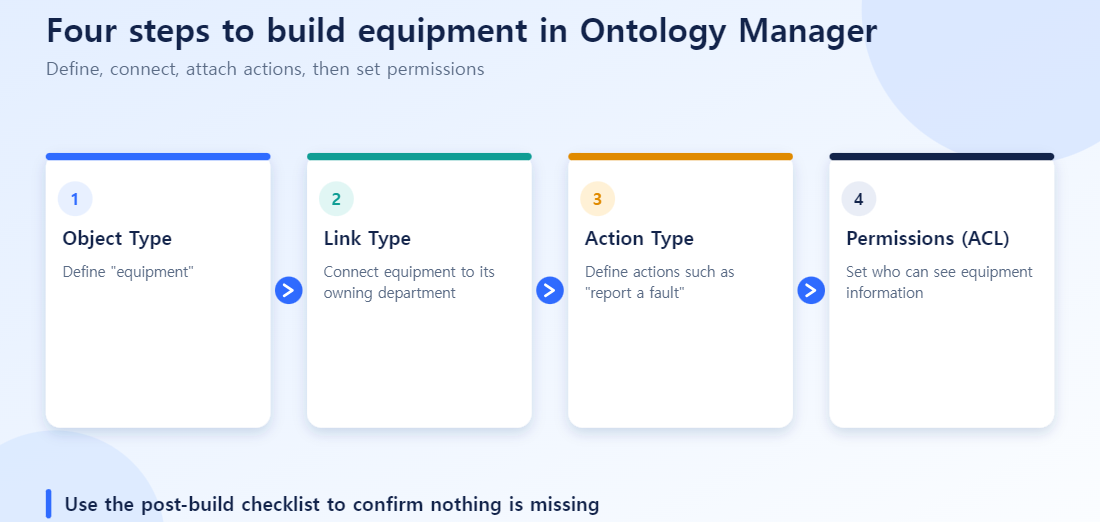
This post walks through building one thing — “Equipment” — end to end, creating an Object Type, then a Link Type, then an Action Type, in that order. The goal: a working flow where a broken piece of equipment triggers an alert, a maintenance history accumulates, and a manager approves the repair.
Where Ontology Manager Sits, and Why You Need It
Data that’s been cleaned in a pipeline is still just a “table.” Rows and columns — neither AI nor a human can tell at a glance that “this is equipment data.”
Ontology Manager turns that cleaned data into business objects like “Equipment,” “Maintenance Order,” and “Assignee.” It sits right after pipeline cleanup and before you build an application like Workshop or Contour on top. Define things well here, and you never have to rewrite the same SQL join every time a new application needs the same data.
Step 1 — Create an Object Type: Define “Equipment”
Connect the source. Point the Object Type at your cleaned EQUIPMENT_MASTER dataset.
Set the Primary Property. Assign the value that uniquely identifies each piece of equipment — usually the original PK, EQUIP_ID — as the primary key. Without it, the Ontology can’t tell which record is which piece of equipment.
Define Properties. Register columns like EQUIP_NAME, LOCATION, and STATUS as Properties one by one, deciding for each whether to turn on certain options.
| Option | Effect | Use in the “Equipment” example |
|---|---|---|
| Searchable | Full-text search indexing | Text search by equipment name |
| Filterable | Usable as a filter condition | Filtering to “running” status in Workshop |
| Sortable | Usable as a sort key | Sorting by most recent inspection date |
A common mistake happens right here: turning on all three options for every Property “just in case.” In a test environment with 30 pieces of equipment, you won’t notice. Once real production data hits 30,000 rows, the indexing cost accumulates regardless. Write down which columns you’ll actually search or filter on first, and turn options on only for those.
Step 2 — Create a Link Type: Connect “Equipment” to “Department”
Now connect the Equipment object to an existing “Department” object. The first thing to decide when creating a Link Type is cardinality.
- 1:1 — like an employee and their HR record, where each side matches exactly one of the other
- 1:N — like one department owning several pieces of equipment. This is the most common case in practice
- N:M — like students and courses, where both sides can have many connections. Requires an intermediate mapping object
The Equipment-Department relationship is usually 1:N. If you want to query both directions — “show me all equipment in this department” and “which department owns this equipment” — setting the link as bidirectional is far more convenient in practice. Build it unidirectional, and you’ll have to redo the link later when you need the reverse lookup.
Step 3 — Create an Action Type: Make “Report a Fault” Executable
Everything so far only defines “what Equipment is.” To actually do something, you need an Action Type. Take “Report a Fault” as an example.
- Trigger target: the Equipment Object Type
- Validation Rule: block a duplicate fault report if the equipment is already in “under inspection” status
- Role-based permission: restrict this Action to the Field Worker Role only
- Side Effect: call an external API to notify the owning department when a fault report is submitted
Action Type is exactly what gives an Ontology the ability to “write” and “act.” Object Type and Link Type alone give you a static, read-only map. Action Type is what makes the business actually move.
Design Checklist
| Stage | What to check |
|---|---|
| Object Type | Is the Primary Property actually a unique value? |
| Property options | Before enabling Searchable/Filterable, is this field actually used on a real lookup screen? |
| Link Type | Could the cardinality change later? If so, consider designing for N:M now with some headroom |
| Action Type | Is there at least one Validation Rule? |
| Action Type | Is it clearly defined which Role is allowed to run this Action? |
3 Common Mistakes
Postponing validation rules. “Let’s build the Action first and add validation later” lets bad state transitions accumulate in the meantime — like a maintenance order getting created again for equipment that’s already been decommissioned. Make it a rule to include at least one validation condition from the start.
Starting with every option turned on. As mentioned above, habitually enabling Searchable, Filterable, and Sortable on everything only drives up indexing cost as data grows, with little real payoff.
Changing cardinality later. If you design something as 1:N and later realize “actually, this should have been N:M,” you have to go back and fix every Workshop screen, AIP prompt, and Action that references that link. Double-checking “is this relationship really 1:N?” early in the design saves much bigger costs down the line.
Step 4: Set Permissions (ACL)
Creating the Object, Link and Action Types doesn’t make them ready to use. Sensitive data such as maintenance history or approval actions needs explicit access settings.
Object-level permissions. Define which user groups can see the “Equipment” Object Type at all. For example, field engineers can see every piece of equipment, while a contractor account sees only what it is responsible for.
Property-level permissions. Properties only some staff should see, such as purchase price or supplier contract terms, can be restricted more narrowly than the object. Everyone sees equipment status, but only procurement sees unit cost.
Action execution permissions. An action that changes state, such as “Approve maintenance”, needs its own execution permission, separate from read access. If users can view but the approve button does nothing, this permission is usually missing.
Adding permissions late means rechecking every Workshop screen and AIP prompt already referencing that data. Decide “who must not see this property” while designing the Object Type.
Post-Build Checklist
| Check | How to verify |
|---|---|
| Is the Primary Property really unique? | Look for duplicate EQUIP_ID values in the source data |
| Does Link Type cardinality match the business? | Confirm with the business whether one piece of equipment can have several owners |
| Does an Action actually write data? | Run the Action from a test account and confirm it lands in OSv2 |
| Are permissions too open? | Recheck access scope from a contractor or external account |
| Is indexing enabled only where needed? | Make sure Searchable/Filterable are on only for properties that need them |
Wrap-up
What Ontology Manager does ultimately comes down to three things: what exists (Object Type), how those things connect to each other (Link Type), and what you can do with them (Action Type). Walk through these three with a single object like Equipment, and you can apply the same sequence to any other target — orders, customers, materials.