
Two ways of working with the same data — “designing a join” versus “walking a relationship” — feel completely different in practice. This post takes a common internal question, looking up a corporate card limit, and solves it two ways: with RDB joins and with Palantir Foundry’s Ontology traversal. The comparison shows concretely what Ontology traversal actually changes.
The Problem: One Sentence, Four Tables
Imagine this question comes in over internal chat:
“How much corporate card limit does Kim Minjun’s team lead have left this month?”
It reads like an everyday sentence, but answering it means touching at least four tables.
| Piece | Information needed | Table |
|---|---|---|
| Kim Minjun | Employee record, team ID | EMPLOYEE |
| Their team | Team record, team lead ID | TEAM |
| Team lead | The lead’s own employee record (references EMPLOYEE again) |
EMPLOYEE (self-join) |
| Card limit | Card issued to the lead, this month’s limit and spend | CARD, CARD_LIMIT |
Answering this question means stitching four pieces of information together through relationships — which makes it a good case for showing what actually differs between RDB and Ontology.
The RDB Way: A Human Designs the Path
Starting Point — A Five-Table Schema
EMPLOYEE   (user_id PK, user_nm, team_id FK)
TEAM       (team_id PK, team_nm, leader_id FK → EMPLOYEE)
CARD       (card_id PK, holder_id FK → EMPLOYEE, card_type)
CARD_LIMIT (card_id FK, month, limit_amt, used_amt)
Relationships exist only in FK column names. Business meaning like “belongs to,” “is the team lead,” or “holds a card” isn’t written anywhere in the schema — a developer has to infer it from the foreign keys.
The Query You’d Actually Write
SELECT  c.card_id,
        cl.limit_amt - cl.used_amt AS remaining_limit
FROM    employee e
JOIN    team t          ON e.team_id   = t.team_id
JOIN    employee mgr    ON t.leader_id = mgr.user_id   -- self-join
JOIN    card c           ON c.holder_id = mgr.user_id
JOIN    card_limit cl    ON cl.card_id  = c.card_id
WHERE   e.user_nm = 'Kim Minjun'
  AND   cl.month  = '2026-08';
A one-sentence question turns into a query with four JOINs, one of them a self-join. Writing this requires someone who knows the schema, and if the question changes even slightly — “what about the whole team’s limit, not just the lead’s?” — the join path has to be redesigned.
Where the RDB Approach Breaks Down
| Problem | Detail |
|---|---|
| Depends on prior schema knowledge | Without knowing table/column/FK relationships you can’t even start — knowledge is locked to specific people |
| Any change to the question means rewriting the query | “What about the whole team, not just the lead?” — the join path has to be redesigned every time |
| Business users can’t query directly | Anyone who doesn’t know SQL has to file a request with IT and wait |
| Meaning gets lost in translation | “Card limit” is human language, card_id is system language — the translation cost never goes away |
The Ontology Way: Walk the Question As Written
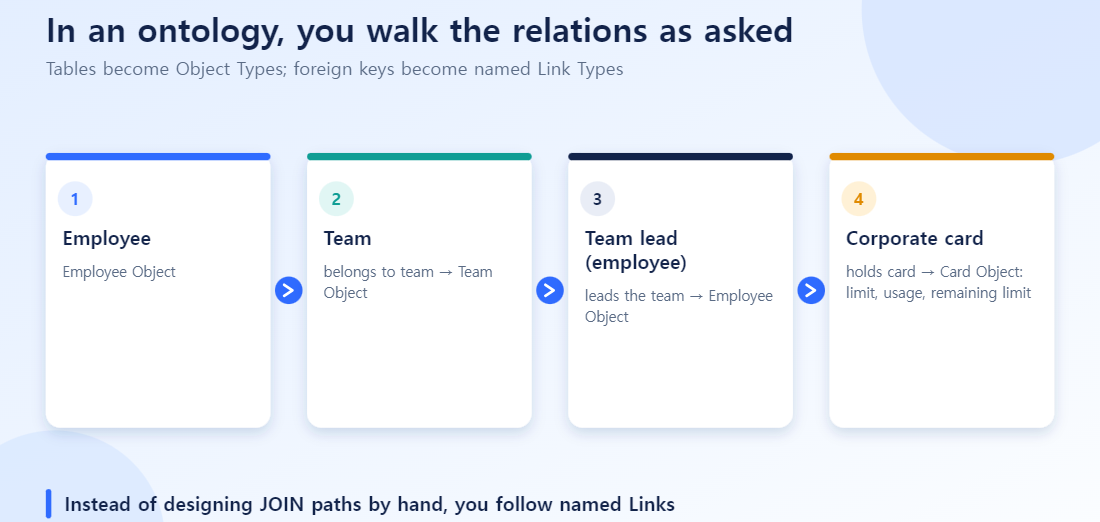
Modeling the Same Data as an Ontology
Tables become Object Types, and FKs become named Link Types, making business meaning explicit in the relationship itself.
- Employee Object —[belongs to team]→ Team Object
- Team Object —[has team lead]→ Employee Object
- Employee Object —[holds card]→ Card Object
- The Card Object’s Properties: this month’s limit, amount spent, and a derived Property, remaining limit (limit − spend), defined once inside the object.
The key shift: relationships that were hidden behind FK column names get promoted to business language — “belongs to team,” “has team lead,” “holds card.”
Querying: Traversing the Question’s Own Word Order
Kim Minjun → team → team lead → card held → remaining limitThe word order of “Kim Minjun’s → team’s → lead’s → card limit → how much is left?” is itself the object traversal path. Instead of designing a new join path, you simply walk the relationships that are already defined.
This traversal gets reused three ways inside Foundry.
| Entry point | What it looks like |
|---|---|
| Object Explorer | Business users click through Employee → Team → Lead → Card, no SQL needed |
| Workshop app | The same traversal logic is reused as a widget on a card-status dashboard |
| AIP / Agent | Natural-language questions are automatically converted into the Ontology path and answered instantly |
Side by Side
| Dimension | RDB joins | Ontology traversal |
|---|---|---|
| Prior knowledge required | Memorize tables, columns, FK structure | Just know the business terms (employee, team, card) |
| Question → answer | A human designs the join path and writes SQL | The question’s word order = the traversal path |
| Handling “team lead” | Self-join plus an alias to work around it | Explicitly defined as a “has team lead” Link Type |
| Computing “remaining limit” | Repeat limit_amt – used_amt in every query | Defined once as a derived Property, reused everywhere |
| Adapting to a changed question | Rewrite the whole query | Change only the traversal path (model is reused) |
| Primary users | Developers, DBAs | Business users + developers + AI agents |
Practical Considerations
- Ontology doesn’t change your data. The source tables and pipelines stay exactly as they are — Ontology adds a layer of “language you can ask questions in” on top. For the process of designing Object Types and Link Types in Ontology Manager, see the Ontology Manager guide.
- The Link Type name is the documentation. Naming the relationship “has team lead” instead of leaving it as the FK column
manager_idmakes the name itself act as schema documentation. Name it carelessly and you lose that benefit. - Define derived Properties once, and carefully. Once “remaining limit” is defined inside the Object Type, every screen, report, and AI agent downstream shares the same calculation. The flip side: if the formula is wrong, that error propagates company-wide just as consistently.
- The self-join doesn’t disappear — it gets a name. The self-join that was awkward in RDB (team lead = employee) doesn’t go away in Ontology. It’s just made explicit as a named relationship (“has team lead”), so you never have to puzzle over aliases again.
Wrap-up
RDB joins and Ontology traversal are two ways of approaching the same data. RDB requires a human to translate the question into the schema’s terms; Ontology names relationships so that the structure of the question itself becomes the traversal path. “How much corporate card limit does Kim Minjun’s team lead have left this month?” — in Ontology, that sentence is the query.
When the Question Gets More Complex: Where Maintenance Differs
Add one more condition to the original question: “Exclude employees hired this year.” With RDB joins, you add a WHERE clause on the hire date in EMPLOYEE. That sounds easy, but you must again decide where in the join chain the condition belongs (on Kim Min-jun, or on the team lead) without distorting the result. The more complex the joins, the more each added condition forces you to re-review the whole query.
With ontology exploration, the path (employee, team, team lead, card limit) stays as it is, and you simply add one filter on the starting set of “employee” objects. You never redesign the path, and the benefit grows as questions get more complex.
RDB vs. Ontology: When to Use Which
| Situation | Best fit |
|---|---|
| One-off analysis, join structure already familiar | Direct RDB joins |
| Non-developers repeatedly ask similar questions | Ontology exploration |
| Join paths change often or conditions get added | Ontology exploration |
| Debugging that requires understanding table structure deeply | Direct RDB queries |