
“Analyze the characteristics of our highest-revenue customer segment from last month.” Answering that question usually means logging into Foundry, opening Contour or Quiver, finding the right Ontology objects, and running the analysis yourself. But what if you could just ask Claude, in a chat window, and get the answer back? That’s exactly what OMCP (Ontology MCP) does.
Where OMCP Differs From RAG
Typical RAG works by text similarity — finding documents that look related to your question and stuffing them into context. It’s closer to “find sentences similar to this one and hand them over.”
OMCP is different. Relationships like “A is a subtype of B” or “this raw material is part of that finished product’s BOM” are already defined in the Ontology, and OMCP exposes that structure directly to Claude. Claude isn’t stitching together text by similarity — it’s answering along an already-defined path, with a precise basis for its answer.
Step 1 — Setting Up the Connection
Understanding the MCP Structure First
- MCP Host: the application a person actually talks to the LLM through, like Claude Desktop or the Developer Console
- MCP Server: the side that controls the actual data source and exposes Tools that Claude can use
- OMCP: the MCP standard configured specifically for Ontology data
4 Steps to Connect
1) Prepare the OMCP server. Set up a server that can query the Ontology. Define a tool like “look up a given node’s relationships,” and internally it queries the Ontology store and returns the result.
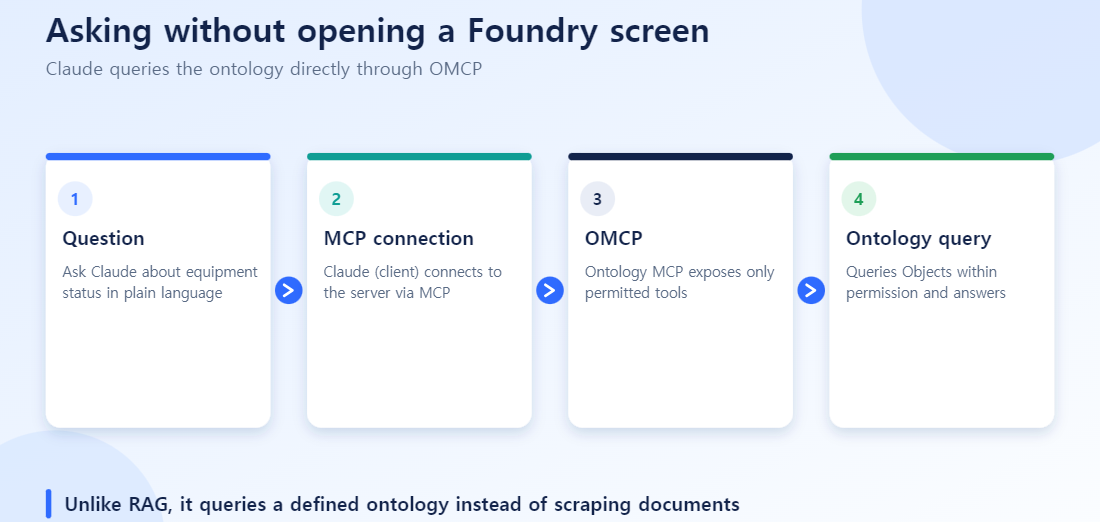
2) Configure the Claude Desktop environment. Register your local OMCP server in claude_desktop_config.json. Set the server launch command and the Ontology store’s connection info (URL, credentials) as environment variables.
3) Verify the connection in the Developer Console. The web-based Developer Console (Workbench) can’t reach your local server directly. You need to expose the server at an externally reachable address and switch the transport to SSE (Server-Sent Events). This is exactly where people get stuck most often — if it works fine in Claude Desktop but fails to connect in the Developer Console, it’s almost always this external-exposure step that’s missing.
4) Sync tools and test. Once you register the MCP endpoint in the Developer Console, Claude automatically recognizes the tools your server exposes. Ask a question about Ontology relationships to confirm the tool is actually being called and returning the right result.
Step 2 — Running a Real Analysis on a Personal AIP Developer Account
Theory alone won’t give you a feel for it — it’s worth trying this at small scale yourself.
- Get a data source: grab a local database or a public dataset (a CSV works fine).
- Model the Ontology: define Object Types like Customer and Transaction, and a relationship like “purchases.” (See the Ontology Manager guide for the details.)
- Connect OMCP: activate the OMCP server in your AIP Developer console and map your local data onto the Ontology structure.
- Use AIP Logic / Assist: now you can ask a natural-language question like “analyze last month’s highest-revenue customer segment” in chat, and get an answer without ever opening the Foundry UI.
Compared to Existing Approaches
| Direct SQL analysis | Plain RAG | OMCP + Ontology | |
|---|---|---|---|
| Understanding relationships | Write JOINs by hand every time | Text similarity only | Pre-defined relationships applied directly |
| Accessibility | Low (SQL required) | Moderate | Anyone can ask in natural language |
| Accuracy | Depends on the query author’s skill | Context can get lost | Relatively stable, grounded in relationship structure |
Where People Trip Up Connecting This
Storing credentials in plain text. It happens more than you’d think — connection info left sitting in a config file as-is. The rule is to use environment variables or a secrets manager.
Testing locally only, then stopping. The classic pattern: works fine in Claude Desktop, fails in the Developer Console. In most cases, it’s the external-exposure step mentioned above that got skipped.
Writing lazy tool descriptions. Claude decides when to call a tool based on its description. A vague description means the tool doesn’t get called when it should, or gets called in the wrong situation. Write “given an equipment ID, returns its owning department and recent maintenance history,” not “a tool that looks up equipment relationships.”
A weak Ontology underneath. Even a perfect OMCP connection can’t fix a shaky Ontology design underneath it — Claude simply has less to ground its answers in. Check your Ontology design before you worry about the connection.
Ignoring personal dev account resource limits. A personal AIP Developer account has limited resources. Start at a scale appropriate for learning.
Trusting Claude’s answers unconditionally. Being grounded in an Ontology doesn’t eliminate the possibility of hallucination entirely. Make it a habit to double-check the basis for any answer used in an important decision.
Where OMCP Sits in the Bigger Picture
Ontology Manager → Foundry pipelines/code → explore/analyze/visualize tools → AIP → OMCP. That’s the five-layer Foundry architecture (connect → pipeline → ontology → application → AI) turned into actual tooling. OMCP sits at the far end of that flow, removing the Foundry UI as a barrier to entry.
Hands-On Setup: Connecting an “Equipment Lookup” Tool
When configuring an OMCP server for the first time, it is easiest to start with one tool: “takes an equipment ID and returns its department and recent maintenance history”.
- Define the tool: register a function such as
get_equipment_history(equip_id)as a tool in the OMCP server code, with a specific description as discussed above. - Map the ontology query: inside the function, query the Equipment Object Type and follow the linked Link Type to fetch maintenance history objects.
- Test locally: register the server in Claude Desktop’s config and test with a question like “Show recent maintenance history for equipment EQ-1023”.
- Switch to external exposure: once it works locally, switch to SSE so the Developer Console can reach it too.
- Re-verify permissions: confirm the account calling the tool has read access to that Object Type and matches the ACL set in Ontology Manager.
Complete these five steps for one tool first, and adding more (such as exposing purchase-request or approval Actions) follows the same pattern.
Frequently Asked Questions
Q. Do I need a separate license to use OMCP?
It uses your existing Foundry/Ontology access as-is. Some additional setup is needed for the MCP integration, but the specific licensing requirements depend on your organization’s Foundry contract.
Q. How are permissions managed when Claude runs an Action?
The Ontology’s RBAC permission system applies as-is. Claude can only access data and Actions within the requesting user’s permission scope.
Q. When is OMCP especially useful?
When you want to query the Ontology or run a simple Action through chat alone, without opening the Foundry UI — and when non-technical users need fast access to data.
Q. How do MCP and AIP relate to each other?
AIP is the AI layer inside Foundry; MCP is the standard protocol for connecting LLM clients outside Foundry. They’re not a substitute for each other — they cover different integration points.
Q. Should every Object Type be exposed through MCP?
Not recommended. Selectively exposing only the Object Types and Action Types that are actually needed is safer from both a security and a management standpoint.