
A business user drags and drops the pipeline together on screen, and IT just snaps in one piece of code — a nice picture, but you still need to check where that nice picture stops holding up
Somewhere between IKEA and a woodshop
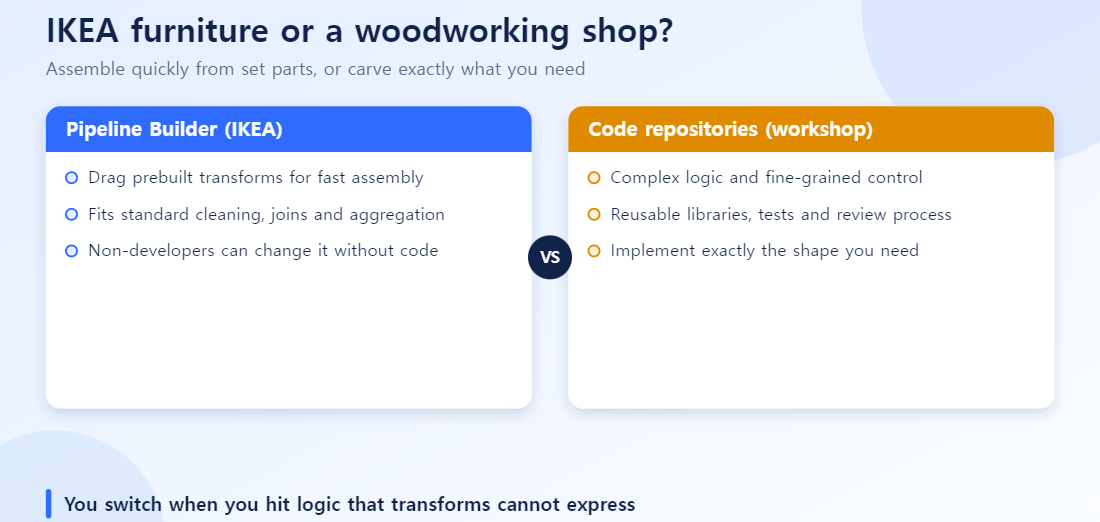
There are two ways to build a data pipeline in Foundry: click-and-assemble Pipeline Builder, and hand-written Python/SQL in Code Repositories. Think of it as the difference between IKEA furniture and a local woodshop. IKEA gives you fixed parts and an instruction sheet — anyone can assemble it fast, but you can’t make a shape that isn’t in the parts list. A woodshop will carve whatever you want, but it takes longer and isn’t something just anyone can do.
Palantir’s own docs describe the two as “complementary, and built to work together to provide solutions for all pipelining needs.”[1] True enough. But the question that actually comes up in practice is more specific: “I want business users to keep building this pipeline themselves. But one particular stage needs iterative computation, or has to call an external API, or the data shape changes every run — do I move the whole thing to code, or can I just carve out that one piece?” This piece works out where that line actually sits, using the official docs, real threads from Palantir’s own developer community forum, and real user reviews.
What Pipeline Builder is actually good at
Pipeline Builder’s stated goal is “building production-grade data pipelines without using code.”[2] Its biggest strength is collaboration — in the docs’ own words, “users who code and users who do not code can collaborate jointly on a pipeline workflow.”[2]
The interface is graph- and form-based, giving real-time feedback (suggesting join keys, column type casts) as you work. Under the hood it runs on both Spark and Flink, so it handles batch and streaming alike.[2] Operations split into “expressions” (one column in, one column out) and “transforms” (whole table in, whole table out) — everything from basic filters, joins, pivots, and aggregations to geospatial joins, k-means clustering, and regex parsing, with over 500 built-in functions.[3] The IKEA catalog, in other words, is a thick one.
But it looks different from the builder’s chair
It’s convenient for the person using the furniture (the business user), but not necessarily for the person assembling it (the developer). On the review site PeerSpot, one principal consultant put it this way: “low-code tools are great for fast development, but highly customized workflows sometimes still require engineering workarounds or deeper technical implementation.”[4] Another reviewer noted: “if I get stuck with the drag-and-drop nature of Pipeline Builder, it is going to be more difficult to migrate that to a different platform.”[4]
Palantir’s own developer community forum echoes the same thing. One user, discussing ontology design, wrote:
“In our organization, we prefer using the pipeline builder over the code builder despite its limitations (e.g., lack of IDE tooling for refactoring, difficulty in copying and adapting code, and easier transform creation in code).”[5]
That’s exactly the tension. Collaboration with business users gets easier, while the actual builder’s own tools — refactoring, code reuse — get more constrained.
Four moments where you need the woodshop
Pulling together the official docs and real community forum threads, the places where the IKEA parts genuinely run out narrow down to four.
| What it can’t do | Why | Real example |
|---|---|---|
| Iterative/recursive computation | Foundry’s build orchestration layer is built to prevent circular structures outright — a detected circular dependency fails the branch check.[6] Pipeline Builder only runs on a one-directional graph (a DAG) | Can’t build a recursive algorithm that keeps recalculating until a condition is met, or graph traversal that walks up a structure to trace a path (e.g., tracing a BOM) |
| Data whose shape changes every run | Every transform has to follow a schema fixed in advance — it’s strongly typed, so a pipeline where column count, names, or types shift at runtime isn’t something the tool is built for | Official forum answer from a Palantir team member: “Pipeline Builder requires you to define your columns upfront because all of our functions are strongly typed. We automatically limit the functions and conditions you can choose based on your schema, so we must know the schema upfront.”[7] |
| Deeply nested data | Basic JSON/XML parsing works, but irregular structures — arrays nested inside arrays several layers deep — can hit real expressive limits | Real forum report: nesting an array inside another array produced a String in the output instead of an Array — a genuine limitation bordering on a bug[8] |
| External APIs and custom integrations | Only sandboxed, pre-built nodes are available — there’s no way to call an arbitrary external HTTP API or plug in a custom library mid-pipeline | Forum question, “What’s the best way to do geocoding in Foundry?” Official answer: “there is currently no way of doing this in a first class way” — the workaround was code[9] |
These four categories are what you get whether you dissect the single official doc (“Considerations: Pipeline Builder and Code Repositories”) or run an independent web survey through Gemini — both converge on almost the same four items. When the vendor’s own framing and an independently-run survey land on the same conclusion, that’s a stronger signal than either alone.
One thing worth being precise about: “can’t build loops” isn’t unique to Pipeline Builder. A Code Repositories branch fails the same build check if it introduces a circular dependency.[6] That’s because Foundry’s dataset build system is one-directional at the platform level, full stop. What you can do is write a while loop or a recursive function inside a single Python transform — Pipeline Builder’s declarative graph simply has no syntax to express that kind of procedural repetition at all. That’s the real difference.
Palantir’s own comparison table
Here’s the official feature comparison table, as Palantir publishes it.[1]
| Pipeline Builder | Code Repositories | |
|---|---|---|
| Recommended use | Production pipelines for organizations, cross-team collaboration | Specialized code-based transforms to add to a pipeline |
| Build interface | Graph and form-based | Web-based IDE |
| Supported languages | No code required | Python, SQL, Java, Mesa |
| Reusability | Copy and paste complete pipelines or stages | Reuse utility functions/libraries, copy code between files |
| Type safety | Strongly typed — errors flagged immediately | Code-based — errors surface at build time |
| Filesystem/API access | No | Yes |
| Debug | Type-safe, instant preview at each step | Debugger and REPL support |
Palantir’s official recommendation: “build your pipeline design in Pipeline Builder,” and only “in cases where users require specialized code-based logic not available in Pipeline Builder” should Code Repositories be used to build that one stage.[1] The examples the docs give for “specialized logic” line up almost exactly with the four categories above — API calls, custom libraries, code-based logical concepts.[1]
The important part is that the two are fully interoperable. A dataset built in Code Repositories can be used directly as input to a Pipeline Builder pipeline, and vice versa — meaning you can slot a single code-built stage anywhere in the pipeline: front, middle, or end.[1] Schedules and health checks are managed as one unit across the whole pipeline in Data Lineage, regardless of which tool built which stage.[1] It’s the same as snapping a custom-carved drawer, made at the woodshop, into a piece of IKEA furniture — the furniture is still one piece of furniture.
A practical order to work through it
- Start in Pipeline Builder, full stop. For standard ETL — filtering, joining, aggregating, type casting, regex cleanup — Pipeline Builder is the default. There’s no reason to give up collaboration speed and type safety before you’ve hit a real wall.
- Only drop to code when you hit one of the four. Does it need iteration, a schema that shifts at runtime, deeply nested data, or an external API? If none of those apply, there’s no reason to write code.
- Carve out just that piece — don’t rebuild the whole pipeline. Rather than migrating the entire pipeline to code, build the problem stage alone in Code Repositories and slot it into the existing Pipeline Builder pipeline. That’s the officially recommended pattern, not a compromise.
- If the graph gets huge (roughly 100+ nodes), reconsider the structure. This isn’t a number from a specific official source, but it tracks with the PeerSpot observation that “highly customized workflows sometimes still require engineering workarounds.” Pipeline Builder isn’t broken at that point — it’s that readability and debuggability degrade past a certain size, and that’s when splitting into modules or moving part of it to code pays off.
Where this leaves things
Pipeline Builder and Code Repositories aren’t competitors — they split the work. If business users and developers need to work on the same screen, Pipeline Builder is the default, and the friction developers feel there (no IDE tooling, hard to reuse code) is a real, existing tradeoff. But “it can’t do loops” isn’t a reason to move an entire pipeline to code. Carving out just the stage that hits one of the four limits — iteration, dynamic schema, nested data, external APIs — is both the officially recommended approach and, in practice, the one with the least friction.
FAQ
Q. Is there any way to fake a loop inside Pipeline Builder? Window and aggregation functions like “Aggregate over window” or “Rollup” can substitute for some repetitive patterns — running totals, ranking, and similar.[3] But real recursion or looping that has to keep recalculating based on a condition simply isn’t in the declarative graph’s vocabulary — that has to move to Code Repositories.
Q. If I slot in one Code Repositories stage in the middle, does schedule/health-check management get more complicated? No. Per the official docs, regardless of which tool built which part, the whole pipeline can be scheduled and health-checked as one unit through Data Lineage.[1] Mixed tooling doesn’t mean split management.
Q. How do I know if my data actually has a dynamic schema? If your column structure varies by source system, or the output columns need to change based on the data content at runtime, that’s dynamic. If the source is fixed and you can define the column list ahead of time, Pipeline Builder is enough.
Q. Is the “100 nodes” threshold an official Palantir guideline? No. It’s a practical rule of thumb that came out of a Gemini web survey run while researching this piece, not a number written anywhere in Palantir’s documentation. The real threshold depends on pipeline complexity and team experience — treat it as a reference point, not a rule.
References
[1] Palantir, Building pipelines • Considerations: Pipeline Builder and Code Repositories, Foundry official documentation.
[2] Palantir, Pipeline Builder • Overview, Foundry official documentation.
[3] Palantir, Pipeline Builder • Transforms • Overview, Foundry official documentation.
[4] PeerSpot, Palantir Foundry Reviews — real user reviews (principal consultant, data engineer, and others).
[5] Palantir Developer Community, Creating link types between Pipeline Builder owned object types and object types not owned by Pipeline Builder, community.palantir.com — real forum post.
[6] Palantir, Building pipelines • Best practices • Development best practices, Foundry official documentation — on circular dependencies and loop prevention.
[7] Palantir Developer Community, Dealing with dynamic schema’s in pipeline builder, community.palantir.com — official Palantir team response.
[8] Palantir Developer Community, Nested array problem, community.palantir.com — real user bug report.
[9] Palantir Developer Community, What’s the best way to do geocoding in Foundry?, community.palantir.com — real user question and answer.