
The human role Palantir called FDE now shares its name with an agent inside AIP
The name is confusing on purpose
We’ve already covered what a human FDE (Forward Deployed Engineer) actually does in FDE vs. PI Consultant vs. Solution Architect. Starting in November 2025, Palantir gave the same name to a feature inside AIP. If your org has AIP enabled, you’ll see “AI FDE” in the sidebar — and it’s not a person, it’s a conversational agent.
The name wasn’t reused by accident. What a human FDE used to do — listen to requirements in natural language, connect data, build an ontology, wire up a screen — is exactly what this agent is now positioned to do through conversation. This piece covers what it actually does, how it’s matured over eight months, what order you actually move through its nine development areas, and how far you should trust it — grounded in official docs, community know-how, real user feedback, and outside critique.
Let’s get the name itself right first. The official documentation introduces it this way:[1]
“AI FDE, the AI-powered forward deployed engineer, is an interactive agent that operates Foundry for you through conversational commands.”
So “AI” and “FDE” aren’t two separate initials bolted together — it’s the human role name FDE (Forward Deployed Engineer) with AI-powered in front of it. Spelled out, the accurate reading is “AI-powered Forward Deployed Engineer.”
What AI FDE actually does
Per the official docs, AI FDE is “an interactive agent that operates Foundry for you through conversational commands.”[1] The core idea is translating natural-language requests into Foundry operations, so you’re not manually clicking through the platform for routine work. That covers running data transforms, managing code repositories, building and maintaining an ontology, and looking up documentation.[1]
It works as a closed loop: analyze intent and context → decide on the right operation → execute with native tools → explain the result.[1] Because the model executes an action, observes the outcome, and uses that feedback to decide the next step, it can carry out multi-step workflows. It supports Anthropic, OpenAI, Google, and xAI models, so you can plug in whatever LLM accounts your org already uses.[1]
One design choice worth flagging: it starts with minimal context by default. The official docs frame this as guarding against “context pollution.”[1] You expand what it can see by dragging in folders, datasets, or documentation yourself — it isn’t handed everything up front. This ties directly into the “give it only the context and tools it needs” best practice covered below.
Eight months, beta to now
| Date | What happened |
|---|---|
| 2025-11-17 | Beta launch for enrollments with AIP enabled[2] |
| 2026-03-12 | Transitioned to general availability (GA)[3] |
| 2026-05 | Global Branch navigation integrated with AI FDE — right-click a branch tag to open Workflow Lineage directly[4] |
| 2026-07 | Added Workflow Lineage graph generation — draw a resource relationship graph on the spot with a keyboard shortcut (Cmd/Ctrl+i)[5] |
Four months from beta to GA is a fast turnaround. Since then, updates have been smaller — mostly navigation convenience and visualization.
What you can actually build — the nine modes
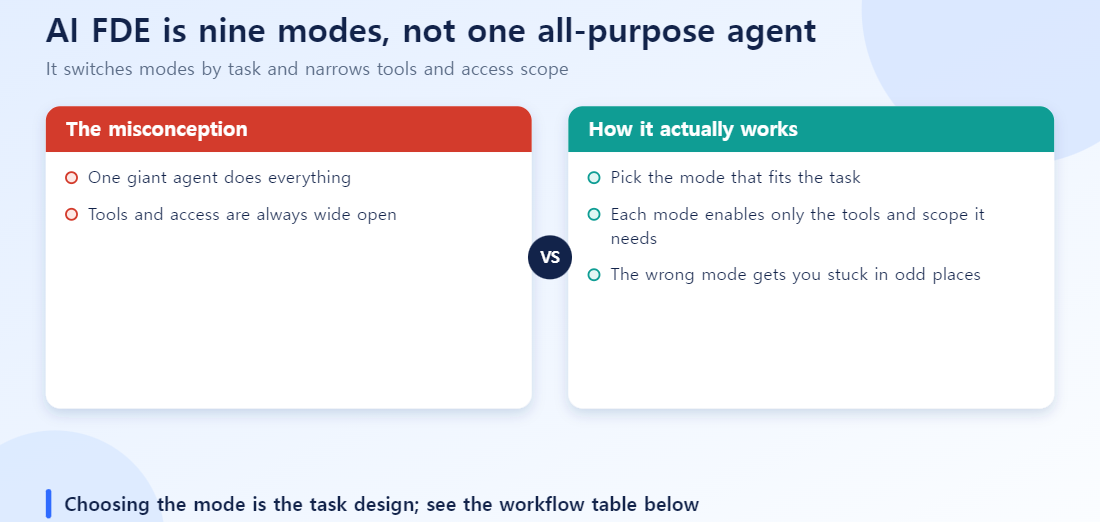
AI FDE isn’t one giant do-everything agent. It switches between nine modes depending on the task, and each mode narrows the tools and access scope it activates.[6] Pick the wrong mode, or forget to switch, and you hit the “tools got silently deselected” problem covered further down — for no obvious reason.
| Mode | What it’s for | What it touches |
|---|---|---|
| Data Integration | Building or modifying data pipelines | Python Transforms, Pipeline Builder |
| Data Connection | Connecting data sources, managing security policy | Connection sources, Egress policy |
| Ontology Editing | Modeling data objects | Object, Link, and Action Types |
| Functions Editing | Writing ontology business logic | Logic, TypeScript, Python functions |
| Exploration | Read-only investigation | Understanding existing pipelines, objects, permissions before you touch anything |
| Governance | Managing security and access control | Roles/permissions, Markings, data protection audits |
| Machine Learning | Managing the ML model lifecycle | Training, evaluating, deploying, tuning (classification, regression, time series, etc.) |
| OSDK React | Building custom frontends | React apps and widgets wired to your ontology |
| Platform Q&A | Guidance and general questions | How Foundry works, architecture explanations |
Separately from the mode split, AI FDE distinguishes agent-level capabilities (switching modes, asking clarifying questions, drafting a plan for review, loading docs on demand, managing context) from domain-level capabilities (filesystem operations, Notepad document management, Solution Design diagrams, executing actions against ontology objects).[6]
The order you actually move through modes
Going from raw source connection to a finished application, you’ll typically move through modes in roughly this order.
Exploration → Data Connection → Data Integration → Ontology Editing → Functions Editing → OSDK React
                                                     (Governance and Approval checks run alongside every step)
Step 1 — Investigate, then connect (Exploration → Data Connection) Start in Exploration mode to look at existing schemas and dataset structure. It’s read-only, so you can survey “what’s actually here” with zero risk of touching the platform. Once you’ve oriented yourself, move to Data Connection mode to define connectors for external databases or ERP systems (SAP ECC, etc.) and set Egress network policy.
Step 2 — Build the pipeline and the ontology (Data Integration → Ontology Editing) In Data Integration mode, build cleaning, deduplication, and join logic with Python Transforms or Pipeline Builder. Then switch to Ontology Editing mode to map that dataset onto Objects, Links, and Actions.
Step 3 — Business logic and the app (Functions Editing → OSDK React) Write the rules that run on top of your ontology in TypeScript or Python via Functions Editing mode, then move to OSDK React mode to build the app or widget that actually uses that ontology and those functions.
Run Governance mode alongside every stage rather than saving it for the end — checking permissions and markings as you go catches problems earlier than a single pass at the finish line.
Safeguards and the official best practices
Once an agent is editing your ontology and publishing functions directly, the first question is “what happens when it gets something wrong.” The official docs name three safeguards.[1]
- Permission inheritance: every action “follows the user’s existing permissions” — AI FDE never operates with broader access than the person using it.
- Tool and context control: you decide what tools it can use and what information it can see.
- Validate before merging: changes go through Foundry’s branching first, run through Transform Preview, Function Preview, and CI checks, and only then get merged.
The official best-practices doc adds a few more operating principles:[7]
- Always verify generated resources before production — test transform logic against sample data, review the code
- Only provide the context and tools a task actually needs — unnecessary access hurts both performance and security
- Break complex work into smaller steps; validate the basic structure before adding complexity
- Use AIP Evals to measure function performance over repeated iterations
- Confirm any action that requires tool approval before it runs
Permission inheritance and branch-based validation are sound design choices. But that’s the vendor’s own description of how it’s built to be safe — how much you can actually trust it in a live production environment is a separate question, which we come back to below.
Community know-how: the Operator Framing Convention
A GitHub community library, palantir-ai-fde-library, argues you should treat AI FDE as a “deployment command executor” rather than a chat assistant.[8] Vague requests increase output uncertainty, so pinning down exact parameters — an “operator command” style — produces more deterministic results. The library targets five personas (human FDEs, data engineers, ontology owners, app developers, platform admins) and was published the same day as GA, on March 12, 2026, with prompt templates covering minimum context, required tools, expected behavior, a verification checklist, and known failure modes.
Weak prompt (conversational)
“Connect the SAP tables and build me a customer data pipeline.”
Better prompt (Operator Framing)
[Target Component]: Data Integration (Python Transform)
[Source Dataset]: /Company/Raw/SAP_KNA1
[Primary Key]: KUNNR (Deduplication required)
[Destination]: /Company/Cleaned/Customer_Master
[Expected Output]: PySpark transformation script handling null values in 'NAME1'.
This lines up with the official “give it only the context it needs” guidance. Even complex migrations like SAP ECC → S/4HANA are documented as patterns in this library.
What real users have actually run into
The following comes from comments on “Getting Started with AI FDE,” a demo (4.5K views) on Ontologize, an official Palantir partner channel, where Gena walks through building a data pipeline.[9] These are the friction points that don’t show up in the official docs.
| Issue | What users reported | Workaround |
|---|---|---|
| Tools silently deselect on mode switch | Switching to Exploration mode drops Workshop-related tools, so AI FDE says it “can’t build this app” | Right after switching modes, open the Tools menu and re-check what you actually need |
| Long sessions slow down or stop loading | Sessions that run long eventually take forever to load, or stop loading entirely (users are still asking for a fix) | Don’t cram a large task into one session — save intermediate results to Notepad and continue in a fresh session |
| Voice input auto-translates | Speaking in French still gets transcribed in English, with no way to turn auto-translation off | Use text input instead of voice when prompt accuracy in another language matters |
There’s positive feedback too. One non-technical user said it let them “build my own app and actually get more done at work,” and shared a context-management tip: write a summary to Notepad at the end of a session — which is exactly the workaround for the session-timeout problem above. Another user described hitting a format mismatch while building a clinical-trial visualization; AI FDE identified the problem and offered a fix.
The same channel has follow-up demos — “How an FDE Uses AI FDE to Author Ontology Functions” and “How an FDE Uses AI FDE: Building a Voice-Enabled OSDK Application” — showing Functions Editing and OSDK React mode in actual use.
AI FDE runs consecutive operations far faster than a human would — potentially dozens within minutes. The official best-practices doc warns this speed can expose bottlenecks in storage I/O or GPU capacity.[7] If you’re planning high-frequency, parallel operations, check your platform’s headroom first.
The skeptical view is worth reading too
A July 2026 Forbes piece rounding up criticism of Palantir’s FDE model raises two points — aimed at the FDE model itself, not the AI FDE feature.[10]
Anaplan CEO Charlie Gottdiener argues the FDE approach is “effective for sales tactics or a quick proof-of-concept, but a problem long-term” — embedding engineers this deeply into a customer’s operations creates lock-in, where the customer ends up paying indefinitely for maintenance and changes.
Manik Sharma of Kinaxis, a former Palantir executive, raises an execution concern: “putting 25-year-old engineers with the customer” creates problems, because they often lack the domain expertise (in his example, supply chain) needed on-site.
The same article cites a 2025 MIT Media Lab study finding that 95% of generative AI pilot projects fail to deliver real business value.[10] AI FDE has to avoid falling into exactly that trap — pilots that work, production that doesn’t.
This critique targets the human FDE model, not AI FDE as a feature. But since AI FDE is explicitly trying to do what human FDEs used to do, through conversation, it’s worth asking whether the same structural weaknesses — lock-in, thin domain judgment — carry over to the agent version.
If you’re evaluating this
If you’re actually considering rolling this out, this is a reasonable order to work through it.
- Start with Exploration and Platform Q&A. Neither touches your ontology, so the risk is low. Use them to gauge answer quality first.
- Anything that writes (Data Integration onward) goes through a branch, no exceptions. The official docs recommend it, and it’s the minimum safeguard that keeps a mistake reversible.
- Check the Tools menu right after every mode switch. This is exactly the real-user complaint above — check it before you burn time wondering why something “isn’t working.”
- Write requests in Operator Framing style. Naming the target component, source, key, and destination instead of “please build me…” makes results noticeably more consistent, even within the same mode.
- Don’t expect it to replace ontology design decisions. AI FDE executes; it doesn’t decide what should be an Object. Without that judgment already in place, it will just build the wrong thing quickly.
Where this leaves things
AI FDE is Palantir’s attempt to move the work a human FDE used to do — embedded, customized, batch-style — into an agent organized around nine modes. The design choices (permission inheritance, branch-based validation) are sound, and four months from beta to GA is fast. But since the model this feature is built on — the human FDE role — has drawn real criticism around lock-in and thin domain expertise, the “just talk to it” pitch matters less than how disciplined you are about mode switching, Operator Framing, and the branch/permission safeguards in actual use.
FAQ
Q. Do I need a separate license to use AI FDE? No — it’s a feature of AIP, activated by an admin on an AIP-enabled enrollment. It isn’t sold separately.
Q. If it edits my ontology and gets something wrong, can I undo it? The official docs recommend making changes on a branch first, then running Transform Preview and CI checks before merging. That said, this is a recommended workflow, not an enforced safeguard — whether it’s actually followed is on the operating team.
Q. What do I do when a session’s context fills up? Only add the documents, datasets, and functions you actually need. For long-running work, write a summary to Notepad and start a fresh session, loading that Notepad back in as context — which also sidesteps the session-hanging issue users reported above.
Q. Is the Operator Framing Convention an official recommendation? No. It comes from an unofficial GitHub community library. It’s worth following anyway because it lines up with the official guidance to provide only the context that’s actually needed.
Q. Does the FDE-model criticism in this article apply to the AI FDE feature itself? Not directly. The critique quoted here targets the human FDE model — engineers embedded on-site doing custom work. But because AI FDE is moving that same working style into an agent, it’s worth asking the same kind of question — lock-in, thin domain judgment — about the agent version too.
References
[1] Palantir, AI FDE • Overview, Foundry official documentation.
[2] Palantir, November 2025 • Announcements, Foundry official release notes.
[3] Palantir, March 2026 • Announcements, Foundry official release notes.
[4] Palantir, May 2026 • Announcements, Foundry official release notes.
[5] Palantir, July 2026 • Announcements, Foundry official release notes.
[6] Palantir, AI FDE • Modes and skills, Foundry official documentation.
[7] Palantir, AI FDE • Best practices, Foundry official documentation.
[8] GitHub, palantir-ai-fde-library — community prompt library documenting the Operator Framing Convention.
[9] Ontologize, Getting Started with AI FDE, YouTube — data pipeline build demo and real-user comments.
[10] Steve Banker, Palantir And Forward Deployed Engineering: What Should We Believe?, Forbes, 2026-07-10.