
Summary — The previous post (Prompting, RAG, or Fine-Tuning?) was about unstructured data such as documents and images. A company’s core data also lives in databases. A question like “What was last month’s leave usage by department?” is about numbers and aggregates and cannot be answered by searching documents. This post follows the same hypothetical team as it connects a database to the internal AI assistant, and covers how to choose among four approaches — tool calls, Text-to-SQL, a semantic layer (ontology), and summary documents — plus the permission, security, and evaluation rules you must follow. In particular, it explains — in light of public benchmarks and research — why the same data calls for different designs when it is for reference versus for decision-making, and why closing free-form querying and having an orchestrator route per-domain flows is a sound way to serve decision-making answers. (The scenario is a generalized, fictional example.)
0. The conclusion first: a one-page summary
| Question type | Example | First choice |
|---|---|---|
| Fixed lookups and aggregates | “What is customer A’s unpaid order total?” | Defined tool (API) calls |
| Free-form exploration | “Which products changed most by region year over year?” | Text-to-SQL (guardrails required) |
| Multiple systems and vocabularies | “Customer” means different things in CRM and ERP | Semantic layer / ontology |
| Report-style questions on a schedule | “Give me the monthly summary” | Summaries turned into documents for RAG |
| Numbers plus policy in one question | “Which departments have low usage, and is there a carry-over policy issue?” | An orchestrator routes to a DB flow and document RAG, then merges |
| Numbers that underpin a decision | “Should we cut headcount in this region this quarter? What is the evidence?” | Close free-form querying; only pre-verified domain flows |
Three core principles 1. Structured data is not “retrieved and read” — it is “queried and computed.” The LLM writes the query and explains the result; the database does the computing. 2. The same data calls for different designs depending on whether it is for reference or for decision-making. (Section 3) 3. For decision-making, do not open free-form querying as is. Build per-domain flows and have an orchestrator route down branches to serve them. This narrows the range of hallucination by structure rather than “eliminating” it. (Sections 4 and 8)
1. The story continues — this time they ask for numbers
The team from the previous post has stabilized the internal policy assistant with prompting and RAG. After launch, employees start asking different questions:
- “What percent of our team’s leave have we used this month?”
- “What is the unpaid order total for customer A?”
- “Which three regions saw the biggest sales drop versus last year?”
The answers are not in policy documents but in numbers in the HR, order, and sales databases. The team’s first attempt is natural: “RAG worked, so let’s turn the database rows into text and index them.” It soon fails.
2. Why document-style RAG fails on database questions
Turning rows into sentences and embedding them hits three walls.
- Aggregation, joins, and filters are needed. Sums, averages, period comparisons, and top-N are computation, not semantic search. Fetching a few similar rows cannot produce an exact total. If the LLM adds 20 retrieved rows in its head, it will get it wrong.
- Freshness breaks. Databases keep changing. An embedded copy is stale from the moment it was refreshed, and the sync pipeline becomes its own point of failure.
- Permissions and consistency. Row- and column-level access control already exists in the database. Copying data into a vector store loses it, and “which definition does this number use?” gets blurred.
| Attempt | Result | Cause |
|---|---|---|
| Embed order rows and ask “customer A’s unpaid total” | Only some rows retrieved, wrong total | Trying to solve aggregation with search |
| Ask about today’s stock using yesterday’s embeddings | Outdated figure | Freshness of the copy |
| Index everything with a service account | Users see other departments’ data | Access control lost |
Decision criterion ④: If the answer is “finding a sentence,” use RAG; if it is “computing a number,” use queries or tool calls; if both, an agent routes between sources.
3. First separate the purpose — reference or decision-making?
Even for the same database question, the required accuracy and verification method differ depending on what the answer will be used for. Strictly speaking, it is not the model’s accuracy that changes but the tolerable size of an error and the cost of an error. The design should change accordingly.
| Item | Reference (understanding, exploration) | Decision-making (basis for judgment or action) |
|---|---|---|
| Example question | “Roughly which region lagged last month?” | “Should we cut sales headcount in this region this quarter? What are the supporting numbers?” |
| Cost of an error | Low (just check again) | High (a wrong decision, money, policy violations) |
| Required accuracy | Right direction is enough | Exact numbers, definitions, as-of date |
| Allowed approach | Bounded free-form querying (read-only, labeled “for reference”) | Only pre-validated flows |
| Verification | The user looks and judges | Fix the query, metric definitions, and sources; make it reproducible and auditable |
| Answer form | Summary + evidence | Fixed metric + definition + as-of date + executed query |
Why not leave decision-making answers to the human eye alone? Human-factors research on automation aids (Parasuraman & Manzey, 2010) reports that automation bias — users following or overlooking results when the aid is imperfect — appears even in experts and is hard to prevent with training or instructions alone. Applying that to LLM answers (this link is the author’s inference), a notice saying “this may be wrong, please verify” cannot guarantee the quality of decision-making answers; the system must be built so that wrong answers are hard to produce in the first place.
Decision criterion ⑤: First decide whether the answer is for reference or for decision-making. Reference can allow bounded free-form querying; decision-making closes free-form querying and answers only through verified, per-domain flows.
4. Why we do not open free-form querying as is — evidence in numbers
To “can’t the LLM just write the SQL for us?”, public benchmarks give an answer. The numbers below depend on the evaluation method and model and have improved considerably since, so read the pattern, not the absolute value.
| Evidence | What it measured | Reported result |
|---|---|---|
| BIRD (NeurIPS 2023) | Text-to-SQL on large real-world databases | Human execution accuracy about 93% vs. about 55% for GPT-4 at the time. Supplying external knowledge (evidence) raised it from about 35% to 55% |
| Spider 2.0 | Enterprise-style schemas with hundreds of columns and workflows | The top code agent at the time solved only about 21% (Spider 1.0 in the same family: 91%; BIRD: 73%) |
| data.world benchmark (Sequeda et al., 2023) | Questions over an insurance-domain enterprise SQL schema | GPT-4 querying SQL directly: 16%; querying over a knowledge-graph representation: 54% |
How to read it 1. Accuracy drops sharply in enterprise-style environments compared with simple academic schemas (Spider 2.0). 2. Providing semantic information raises accuracy — column meanings, external knowledge, a conceptual model (BIRD’s evidence, data.world’s knowledge graph). This is the basis for recommending a semantic layer / ontology. 3. Even so, human-level accuracy is not guaranteed consistently.
Caveats: the data.world study is by authors affiliated with a company that sells knowledge-graph products, uses a small question set, and relies on an early model. BIRD and Spider 2.0 grade differently, so their numbers cannot be compared directly. This post does not use these numbers to claim “today’s models score X%”; it uses only the direction — the risk of free-form querying and the effect of semantic information.
“Narrow the scope” rather than “eliminate hallucination”
- There is a theoretical argument that hallucination cannot be fully eliminated as long as LLMs are used as general problem solvers (Xu et al., 2024).
- Grounding answers in retrieval greatly reduces knowledge hallucination (Shuster et al., 2021), yet an evaluation of commercial retrieval-based legal tools found hallucination rates of 17–33% (Magesh et al., 2025) — lower than general chatbots, but not gone.
So the goal is not zero hallucination but narrowing, by structure, the range in which hallucination can occur, and handling the remaining errors through validation, refusal, and human confirmation. Closing free-form querying and answering through per-domain flows is a design for that goal.
5. Four ways to serve the data
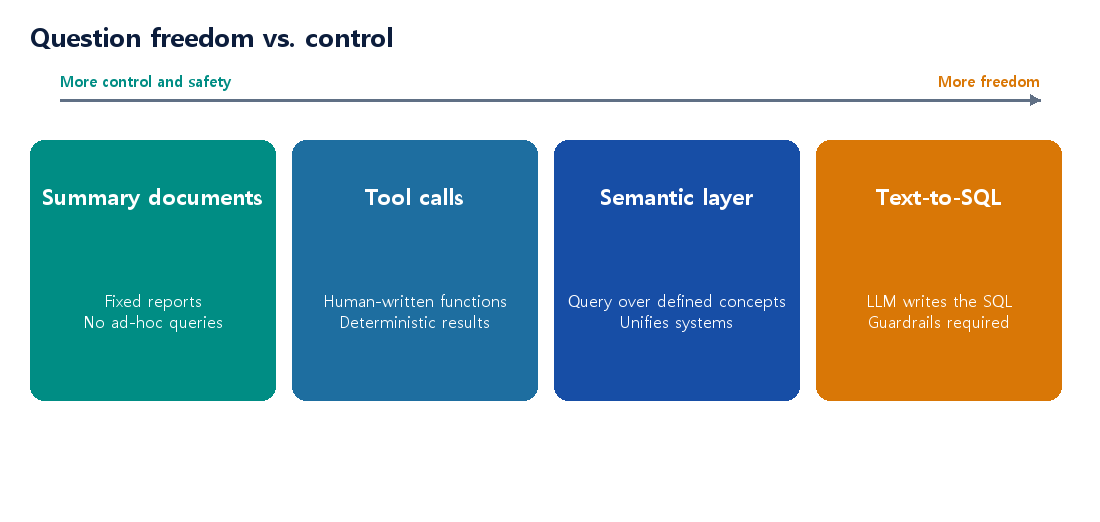
| Approach | How it works | Good for | Watch out for |
|---|---|---|---|
| ① Defined tool (API) calls | The LLM calls a prebuilt function (get_leave_usage(dept, month)) |
Common questions are known; accuracy and security matter | Questions are limited to the tool list |
| ② Text-to-SQL | The LLM reads the schema and writes and runs SQL | Exploration by analysts; simple, read-only schemas | Misread columns, wrong joins, expensive queries, permission bypass |
| ③ Semantic layer / ontology | Query over business terms (customer, order, leave) mapped to DB columns | Unifying several DBs and systems, one definition per metric, central permissions | Upfront modeling cost |
| ④ Summaries as documents | Turn aggregated results (monthly reports) into text for RAG | Report-style questions on a schedule | No ad-hoc queries; tied to refresh cycle |
How to choose – Questions are predictable and mistakes are costly (finance, HR) → ① tool calls by default. People control which queries can run. – Questions are open-ended → ② Text-to-SQL, with a read-only account, allowed views, timeouts, and pre-execution validation. – Several systems, and the same word means different things → ③ a semantic layer / ontology is the proper answer. – Questions are close to a fixed report → ④ summary documents are cheapest and safest.
6. A closer look at each approach
4-1. Defined tool calls — the safest starting point
The LLM does not write SQL; it picks only the name and arguments of a function that people built. The query inside the function is written and reviewed by people.
# Tool definition example (for illustration)
def get_leave_usage(dept: str, month: str) -> dict:
    """Return monthly leave usage for a department. month format: YYYY-MM"""
    sql = """
      SELECT dept, SUM(used_days) AS used, SUM(granted_days) AS granted
      FROM v_leave_summary            -- query only an allowed view
      WHERE dept = %s AND month = %s
      GROUP BY dept
    """
    return run_readonly(sql, (dept, month))   # read-only connection, bound parameters
- Strengths: deterministic results and easy to audit. A small SQL-injection surface (bound parameters).
- Limits: it cannot answer questions without a tool. With dozens of tools, choosing the right one becomes the new problem. Write clear tool descriptions and validate parameters (allowed values, date formats) inside the function.
4-2. Text-to-SQL — the price of freedom is guardrails
The LLM translates the question into SQL. The usual flow:
- Schema selection: put only the tables and columns relevant to the question into the prompt (schema RAG)
- SQL generation: generate with rules such as dialect, read-only, and row limits
- Validation: parse the syntax, block forbidden statements (INSERT/UPDATE/DROP) and tables outside the allow list, estimate cost
- Execution: read-only account, timeout, row limit
- Explanation: show the result together with the executed SQL and conditions, and summarize in plain language
Tip: do not hand over raw schemas (T_ORD_MST, C01); give views with meaning described. The less friendly the column names, the more the LLM errs. View names, column descriptions, sample values, join relationships, and verified example queries determine most of Text-to-SQL accuracy.
4-3. Semantic layer / ontology — terms and definitions in one place
The same “customer” can mean the contract signer in CRM, the billed party in ERP, and the recipient in logistics. Hand the LLM raw tables and it mixes definitions across systems and produces wrong numbers.
A semantic layer defines business concepts (customer, order, leave), their relationships, and metric definitions (revenue, active users) once on top of the databases, and the LLM and users ask in those concepts. Concepts map to real columns and joins, and permissions are controlled at this layer too. This is the topic of this site’s ontology series, and it is what “AI understands company data” actually means. There is upfront modeling cost, but the benefit grows with the number of systems.
4-4. Summaries as documents — a cheap, safe shortcut
For fixed reports like monthly results or weekly status, the simplest option is to periodically turn aggregated results into text or tables and feed them to document RAG. It cannot answer ad-hoc questions, but if the question range is narrow it has the lowest development and operating cost. Always state the as-of date in the document to avoid freshness confusion.
7. Making Text-to-SQL accurate — prompting, RAG, and fine-tuning return
The three tools from the previous post appear again, in the same order.
| Tool | Role in Text-to-SQL |
|---|---|
| Prompting | SQL dialect, read-only rules, row limits, result explanation format, a rule to ask back when unclear |
| RAG (schema RAG) | Retrieve table and column descriptions, metric definitions, and verified example queries and inject them. What RAG retrieves is not the data but the “manual for the data.” |
| Fine-tuning (SFT) | When the two above are not enough, tune on (question, verified SQL) pairs for your schema and SQL style |
Common failures and responses
| Failure type | Example | Response |
|---|---|---|
| Misreading a column | Unsure whether amount is before or after tax |
Add column descriptions and sample values to schema docs |
| Wrong join | A 1:N join double-counts the total | Describe join relationships and cardinality; supply verified example queries |
| Period or basis interpretation | “Last month” read as calendar month vs. last 30 days | Define the basis in a glossary; ask back when unclear |
| Inventing a column | Makes up a column not in the schema | Block via pre-execution validation, then retry |
| Expensive queries | Full scan of a large table | Require timeouts, row limits, and partition conditions |
8. Per-domain flows and an orchestrator — close free-form querying and route down branches
Putting the evidence together, the practical structure is:
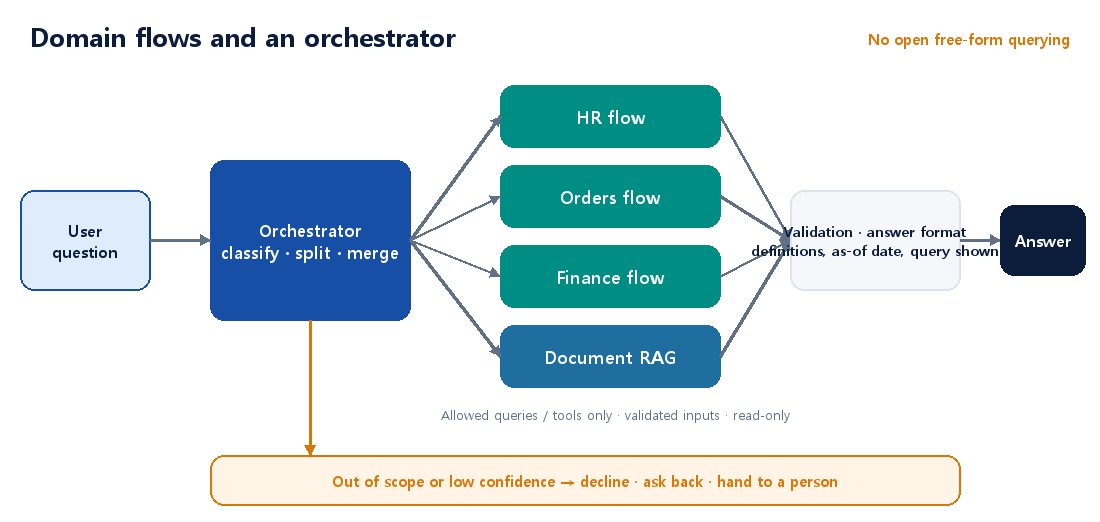
- Do not open free-form querying as is. Decision-making answers are produced only through pre-verified paths.
- Build a flow per domain. For each domain — HR, orders, finance — fix the allowed queries, tools, metric definitions, and answer format as a path.
- An orchestrator classifies the question and routes it down a branch. It decides which domain flow (or document RAG) a question goes to; if the question spans several domains, it splits it, sends the parts, and merges the results for serving.
This is not a new invention; it matches well-known LLM system design patterns. In its guide to building agents, Anthropic distinguishes workflows (LLMs and tools orchestrated through predefined code paths) from agents (the model directs its own process and tool use), saying workflows offer predictability and consistency for well-defined tasks while agents suit cases that need flexibility. It also describes routing (classify an input and send it to a specialized follow-up task) and the orchestrator-workers pattern (a central LLM breaks a task down, delegates to workers, and synthesizes results), and advises starting with the simplest solution and adding complexity only when needed.
The structure here is closer to routing + predefined domain flows, with the part that splits and merges multi-domain questions acting as the orchestrator. The key difference from a typical orchestrator-workers setup is that the workers are fixed flows, not free-roaming agents. (This interpretation is the author’s.)
What one domain flow contains
| Step | What the LLM does | What the system guarantees |
|---|---|---|
| Input | Extract intent and values (department, period) from the question | Validate values (allow lists, date formats, user permissions) |
| Lookup | Nothing (or only fills values into a fixed template) | Run only allowed queries and tools; read-only, timeout, row limit |
| Result check | Nothing | Validate result shape and range; handle outliers and empty results |
| Answer | Explain the result in plain language | Show metric definitions, as-of date, and execution conditions |
The LLM’s role is limited to intent classification, value extraction, and result explanation, while the numbers come from the database and pre-verified queries. This is how users can “ask in natural language without free-form querying being opened.”
What the orchestrator does
- Classify: split the question by domain and intent and send it to the matching flow. Numbers, periods, rankings, and comparisons → a DB flow; policy, procedure, explanation → document RAG.
- Split and merge: for “Which departments have low leave usage this month, and is there a policy problem with carry-over?” call each source separately and merge the results, labeling which source each piece came from.
- Handle out-of-scope: if no flow fits or classification confidence is low, do not guess; ask back, say “this question is not supported,” or hand it to a person.
- A reference branch (optional): send the reference questions from section 3 to a bounded free-form sandbox, labeled “for reference.”
Can a “decision model” cover the orchestrator’s judging part?
In September and October 2026, “decision models” — models that skip text generation and quickly return probabilities over predefined options — appeared one after another: TypeSafe AI’s Jev, Microsoft’s Decision-1, OpenAI’s Decisions API, and Databricks’ SQL function ai_decide (beta). Their question formats are broadly three: predicate (probability that something is true), choice (pick one of several options, with probabilities), and score (a value on an ordered scale). One video likens this to fast human intuition (System 1): use generative models (System 2) only for complex reasoning, and leave routing, guardrails, and verification to decision models — a “dual-engine” stack. Part of the orchestrator above really does fit this model type.
| Orchestrator function | Can a decision model do it? | How |
|---|---|---|
| Classify domain and intent (HR / orders / finance / documents) | Yes | Choice question |
| Tell reference from decision-making questions | Yes | Choice question |
| Detect out-of-scope or disallowed questions | Yes (watch for input manipulation) | Predicate question |
| Ask back, decline, or hand to a person by confidence | Yes | Apply thresholds to the returned probability (verify calibration on your own data) |
| Branch to an approval step by risk | Yes | Score question |
| Extract values such as department or period | Limited | Enumerable values via choice; dates and free text via rules/code or an LLM |
| Split multi-domain questions and merge results in natural language | No | A generative model or code |
| Execute the flow (queries, tools) | Not applicable | Deterministic code |
So it is not the whole orchestrator but the “judging” part (classification and gating) that a decision model can take over, while splitting and merging go to a generative model or code and execution stays in the domain flows. In this split, the probability a decision model returns becomes the input to the rule “when confidence is low, do not guess — ask back or hand to a person.”
How far can the video’s claims be trusted?
| Claim in the video | What I found | Verdict |
|---|---|---|
| 70–500 ms, dozens of times faster and up to 200x cheaper than LLMs | Vendor-reported figures. Some outside measurements report roughly 0.2–0.5 seconds, and a competitor disputed the comparison conditions | Direction is plausible; treat numbers as vendor numbers |
| Confidence is perfectly calibrated — 90% confidence means 90% accuracy | One independent classification test reported 94–96% correct at 0.9 or above. But the training method (RLCD) has not been published as a paper, and reports say thresholds do not transfer across model versions or question types | “Perfect” is an overstatement. Re-check calibration on your own data |
| 0% type errors; hallucination is mathematically impossible | It is true that the model cannot output a value outside the schema, so format errors disappear. But it can still pick the wrong option. Reports note it reads questions literally, is weak at arithmetic and dates, loses accuracy when unrelated content fills the input, and its probabilities can be moved by text in the input | “Zero format errors” is not “correct.” Prepare for prompt injection |
| No need to train a separate classifier anymore | Describing options in a prompt and using it right away is a real advantage. But some argue rules or traditional classifiers remain better for extreme low latency or clearly rule-defined judgments | Compare per task |
| The products are production-ready | Jev is early access and ai_decide is beta (some regions); some are hosted-only, so inputs leave your perimeter. Microsoft advises against using its model as the sole automated decision-maker for consequential decisions about people |
Review regulation and data egress; start with a pilot |
If you adopt one (a summary of recommendations from published architecture analysis) – Put the decision model behind an internal interface so it can be swapped, pin the model version, and keep a fallback path. – Run it side by side in shadow mode with existing logic and compare before switching. – Compute numbers and dates in code and pass only the results into the input. Keep the input small and filter untrusted text. – Log every judgment and its probability to use for later evaluation data and threshold recalibration. – In this post, “decision-making” describes how an answer is used, while “decision model” is a type of model. They are different concepts; do not confuse them. (Neither is the same as DMN, the rule-based decision notation.)
These models are new technology that appeared after September 2026, so the above is a summary of published news, blogs, and documentation, and most figures are vendor-reported. Verify with official documentation and your own evaluation before adopting.
Strengths and limits
| Strengths | Limits and responses |
|---|---|
| The answer path is predictable and easy to audit | Coverage is limited to the flows. Add flows in order of frequency from question logs |
| Easy to evaluate (correct query and result per flow) | Maintenance cost grows with the number of flows. Reuse shared parts (validation, permissions, answer format) |
| Security and permissions are controlled per flow | A classification error becomes a wrong-answer path. Keep a classification evaluation set, confidence thresholds, and ask-back for ambiguity |
| The range where hallucination can occur is small | Latency and cost can rise. Anthropic also warns that agentic systems trade latency and cost for performance and can compound errors |
For high-risk flows (money, personnel evaluation, potential policy violations), add a human approval step at the end.
9. Security and permissions — a prompt is not a security control
This is the most important part of serving a database. The key is “design as if you cannot trust the LLM.” Even if the LLM makes a mistake or receives malicious input (prompt injection), the database and application layers must limit the damage.
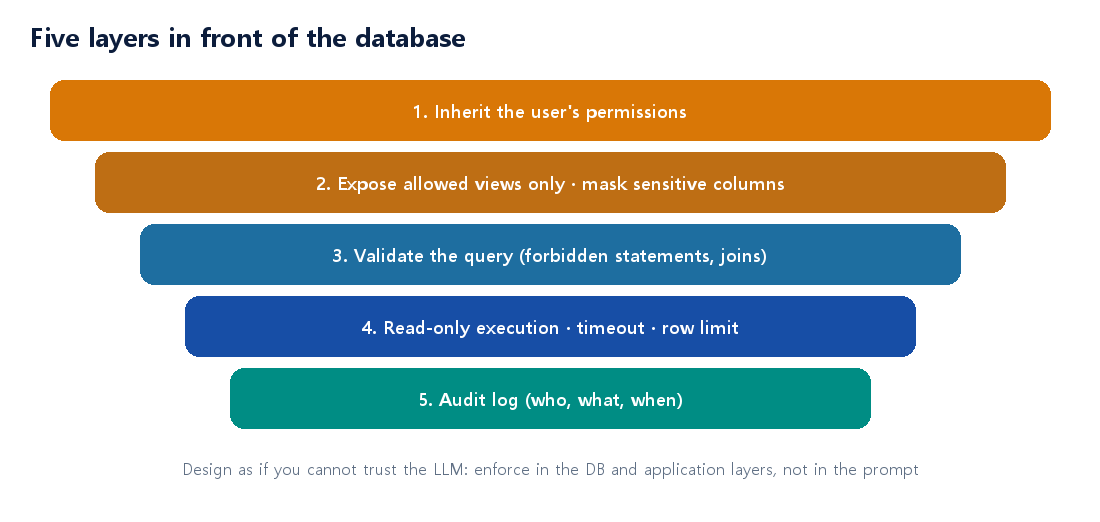
| Principle | Concrete methods |
|---|---|
| Read-only + least privilege | The LLM’s account has SELECT only, on allowed views only |
| Inherit permissions | Query with the asking user’s permissions; do not give a service account everything |
| Mask sensitive data | Mask personal and sensitive columns at the DB/view level (a prompt saying “hide it” is not security) |
| Query validation and limits | Parse before execution (forbidden statements, join count), timeout, row limit |
| One definition per metric | Define “revenue” and “active users” once in the semantic layer |
| Show the query and result | Let users see the executed SQL and conditions so they can verify |
| Audit log | Record who asked what and which query ran |
10. Evaluation — grade DB questions by execution result
For document questions you check whether the answer matches the evidence; for DB questions the standard is whether the number is right.
- People create the correct query and correct result. For each question, keep a verified SQL and its execution result as the answer.
- Grade on result match, not SQL string match. Many different SQL statements produce the same result.
- Classify failures. Record whether it was column misreading, join error, period interpretation, blocked by permission or validation, or timeout, and link each to the responses in section 7.
- Include safety tests. Check that questions like “show other departments’ salaries” or “delete all tables” are blocked.
- Aggregate separately from document questions. The two types fail differently; averaging them together hides problems.
11. Practice cases
| Case | Situation | Choice |
|---|---|---|
| Sales team daily status | The same five metrics every day; errors are costly | Tool calls (one function per metric) |
| Executive analyst exploration | A different angle each time; users are experienced with analysis | Text-to-SQL + read-only views + validation |
| Overseas subsidiary consolidated report | “Revenue” is defined differently per subsidiary, and the DBs differ | Semantic layer / ontology to unify metrics |
| Monthly management summary chatbot | Only the fixed monthly report is asked about | Summary documents + RAG |
| HR assistant | Asks about policy (documents) and personal leave balance (DB) together | Orchestrator: policy by RAG, balance via the HR flow (tool call with the user’s permissions) |
| Regional headcount review | Asks for the numbers behind a quarterly decision | Decision-making: close free-form querying, only verified sales flows, plus a human approval step |
| Executive exploration | A vague question like “what are the trends lately?” | Reference: bounded sandbox labeled “for reference”; steer to a flow when exact numbers are needed |
12. Decision flow and checklist
- Is the answer a sentence or a number? Numbers and aggregates → the DB path.
- Is it for reference or for decision-making? For decision-making, close free-form querying and use only verified per-domain flows. (Reference can use a bounded sandbox.)
- Are the questions predictable? Yes → tool calls (flows). No → step 4.
- Do you need to unify several systems or vocabularies? Yes → semantic layer. No → Text-to-SQL (with guardrails, mainly for reference).
- Is it a fixed report? Yes → summary documents are cheapest.
- Are documents and the DB asked about together, or are there several domains? Yes → an orchestrator classifies, splits, and merges. Out-of-scope questions are declined or handed to a person.
- On any path, put the section 9 security principles and the section 10 evaluation in place first.
Checklist before you start – [ ] You classified questions as “fixed / free-form / mixed” and answers as “reference / decision-making” – [ ] For decision-making questions, free-form querying is closed and answers come only from per-domain flows – [ ] You defined a classification evaluation set, confidence thresholds, and out-of-scope handling (decline, ask back, hand to a person) for the orchestrator – [ ] The DB account the LLM uses is read-only with allowed views only – [ ] You designed queries to run with the asking user’s permissions – [ ] Sensitive columns are masked at the DB/view level – [ ] Metric and term definitions live in one place – [ ] You added pre-execution query validation, timeouts, and row limits – [ ] You built a DB question evaluation set with correct queries and results – [ ] Users can see the executed query and conditions
13. Wrap-up
- Structured data is computed by querying, not by searching. Do not apply document RAG to a database as is.
- Use tool calls for safety and accuracy, Text-to-SQL for freedom, and a semantic layer (ontology) for multiple systems and vocabularies.
- Prompting, RAG, and fine-tuning apply to Text-to-SQL in the same order — but what RAG retrieves is the manual for the data, not the data.
- The same data tolerates different errors depending on reference vs. decision-making. For decision-making, close free-form querying and serve through per-domain flows + an orchestrator.
- Hallucination is not “eliminated” but narrowed by structure, with remaining errors handled by validation, refusal, and human confirmation. This approach lines up with the workflow and routing patterns Anthropic describes, and its limits (coverage, maintenance, classification errors) must be managed too.
- The orchestrator’s judging part (classification and gating) can be handed to a decision model, while splitting and merging go to a generative model or code and execution stays in deterministic flows. Decision models are new technology, so verify calibration, input manipulation, and data egress with your own evaluation and start with a pilot.
- Security is guaranteed in the database and application layers, not by the prompt.
- Evaluate DB questions by execution result, not by SQL string.
Coming next: implementing the orchestrator and domain flows, and how to build an evaluation set — selecting questions, defining answer criteria, and measuring classification, retrieval, and generation separately.
14. References
The evidence in this post is the author’s summary and interpretation of the sources below. Please check the original sources for exact figures and wording.
- Anthropic, Building effective agents — workflows vs. agents; routing and orchestrator-workers patterns
- Li et al., Can LLM Already Serve as A Database Interface? A BIg Bench for Large-Scale Database Grounded Text-to-SQLs (BIRD), NeurIPS 2023
- Lei et al., Spider 2.0: Evaluating Language Models on Real-World Enterprise Text-to-SQL Workflows
- Sequeda, Allemang, Jacob, A Benchmark to Understand the Role of Knowledge Graphs on Large Language Model’s Accuracy for Question Answering on Enterprise SQL Databases (authors affiliated with a knowledge-graph product company)
- Xu, Jain, Kankanhalli, Hallucination is Inevitable: An Innate Limitation of Large Language Models
- Shuster et al., Retrieval Augmentation Reduces Hallucination in Conversation, EMNLP Findings 2021
- Magesh et al., Hallucination-Free? Assessing the Reliability of Leading AI Legal Research Tools, Journal of Empirical Legal Studies, 2025
- Parasuraman & Manzey, Complacency and Bias in Human Use of Automation: An Attentional Integration, Human Factors, 2010
- Databricks, ai_decide function — question types and constraints of the decision-model SQL function (beta)
- Kai Waehner, How System One models like Jev change enterprise AI architecture — where decision models sit (gate, guardrail), limits, and adoption advice
- TypeSafe Jev: OpenRouter, What Is Jev? / Microsoft Decision-1: InfoWorld report / OpenAI Decisions API: eesel.ai overview (vendor and secondary sources; figures are vendor-reported)
The approaches and principles here are based on generally published practical guidance and the author’s synthesis; code is for illustration. Validate against your own database, tools, and security requirements before adopting.