
→ See the full AI Agent Implementation Series
Why This Structure Is Needed
The more documents pile up, the more expensive it gets to find “which page, which paragraph” has what you need. Dumping the entire document set into an LLM’s context hits the context limit as soon as the corpus grows even a little, and irrelevant content mixed in degrades answer quality. RAG solves this by not making the LLM read everything for every question — instead, search narrows things down to relevant fragments, and only those become the grounding evidence.
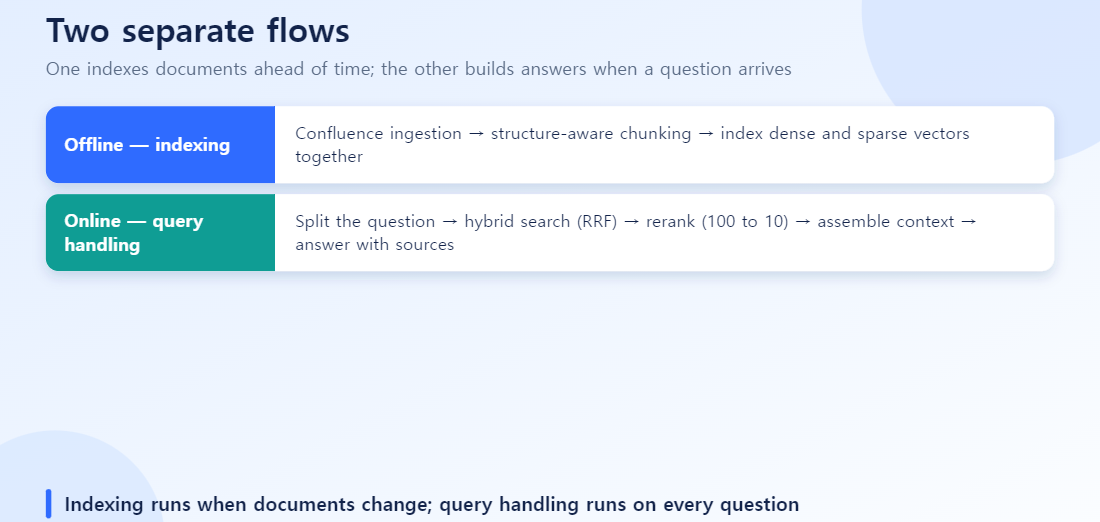
The Overall Architecture — Two Separate Flows
| Flow | When it runs | Steps | |
|---|---|---|---|
| Ingestion | Documents → searchable index | On document add/update (batch/incremental) | Collect → chunk → embed (dense+sparse) → index |
| Query | Question → answer | Every user question (real-time) | Query processing → hybrid search → rerank → assemble context → generate |
Keeping these two separate matters — a slow indexing pipeline should never affect the user-facing response time. Below, each step comes with the actual code pattern behind it.
1. Ingestion — Pulling Documents from Confluence
LangChain’s ConfluenceLoader lets you pull pages space by space.
from langchain_community.document_loaders import ConfluenceLoader

loader = ConfluenceLoader(
    url="https://your-site.atlassian.net/wiki",
    token=API_TOKEN,
)
docs = loader.load(
    space_key="SPACE",
    include_attachments=True,
    limit=50,
    max_pages=1000,
)
Re-reading the entire space every time is wasteful, so in practice teams use incremental sync — comparing each page’s version.when (last-modified timestamp) from the Confluence API against the last sync checkpoint, and only re-chunking and re-indexing pages that actually changed.[1] This way, a manual growing to hundreds or thousands of pages never requires a full reprocess.
2. Chunking — Cutting Along the Structure
The baseline approach is RecursiveCharacterTextSplitter. It prioritizes double newlines, then single newlines, then spaces, preserving natural boundaries as much as possible while cutting to a target length.
from langchain.text_splitter import RecursiveCharacterTextSplitter

splitter = RecursiveCharacterTextSplitter(
    chunk_size=1024,     # token-based; should match the embedding model's length_function
    chunk_overlap=128,   # ~12% — softens context loss at chunk boundaries
)
chunks = splitter.split_documents(docs)
A chunk_size of 1024 tokens with a chunk_overlap of 128 tokens (roughly 12%) is a common starting point in practice.[2] For wiki-style documents like Confluence that already have clear heading/section structure, the standard pattern is to first split by MarkdownHeaderTextSplitter along headers, then run each resulting section through RecursiveCharacterTextSplitter as a second pass.[3] This significantly reduces the “the table header is here but the table body ended up in the next chunk” kind of context breakage.
3. Indexing Dense + Sparse Vectors Together
Vector databases like Qdrant can store a dense vector and a sparse vector on the same point (record). The sparse vector is generated using FastEmbed’s BM25 implementation.
from fastembed import SparseTextEmbedding, TextEmbedding

dense_model = TextEmbedding("BAAI/bge-base-en-v1.5")
sparse_model = SparseTextEmbedding("Qdrant/bm25")

for chunk in chunks:
    dense_vec = list(dense_model.embed(chunk.page_content))[0]
    sparse_vec = list(sparse_model.embed(chunk.page_content))[0]
    client.upsert(collection_name, points=[{
        "id": chunk.id,
        "vector": {"dense": dense_vec, "sparse": sparse_vec},
        "payload": {"text": chunk.page_content, "source_url": chunk.metadata["source"], "title": chunk.metadata["title"]},
    }])
BM25 sparse vectors need corpus-wide term-frequency (IDF) statistics to stay accurate, so it’s worth keeping IDF statistics refreshed as documents are added.[4] Storing metadata like the source URL and title in the payload is the key move here — it’s what later lets you attach citations to the answer.
4. Query Processing — What “Chunking the Question” Actually Means
You’ll sometimes hear the question described as being “chunked,” but strictly speaking chunking is a document-splitting term. What teams actually do to the question is one of two things.
- Multi-query expansion: an LLM rewrites the original question into several differently-worded versions, searches each separately, then merges and deduplicates the results. This reduces misses caused by a mismatch between the user’s wording and the document’s wording (synonyms, abbreviations).
- Query decomposition: a compound question like “given A and B, what happens to C” gets broken into sub-questions like “what is A” and “what is B,” each searched separately. This is strong for multi-hop questions that require pulling from several documents.
from langchain.retrievers.multi_query import MultiQueryRetriever

mq_retriever = MultiQueryRetriever.from_llm(
    retriever=base_hybrid_retriever, llm=llm,
)
docs = mq_retriever.invoke("What are the conditions for carrying over unused leave?")
# Internally, the LLM generates 2-3 reworded variants, searches each, and merges the results
“Pulling 100 candidates” refers to the size of the combined candidate pool from running hybrid search across these expanded queries — the goal at this stage isn’t ranking the right answer first, it’s making sure the right answer is somewhere in the pool, so this step casts a wide net.
5. Hybrid Search — Combining Dense and Sparse with RRF
Qdrant’s Query API runs dense and sparse search as separate prefetch calls, then combines them with built-in Fusion.RRF.
from qdrant_client import models

result = client.query_points(
    collection_name,
    prefetch=[
        models.Prefetch(query=sparse_vec, using="sparse", limit=20),
        models.Prefetch(query=dense_vec, using="dense", limit=20),
    ],
    query=models.FusionQuery(fusion=models.Fusion.RRF),
    limit=100,
)
RRF (Reciprocal Rank Fusion) is the standard way to solve the problem that the two search methods produce scores on incompatible scales, so you can’t simply average them — instead, it scores each result purely by its rank in each list using 1/(k+rank) and sums those scores, with k typically set to 60.[5] If you’re using LangChain, combining a dense retriever with BM25Retriever through a weighted EnsembleRetriever achieves the same effect.
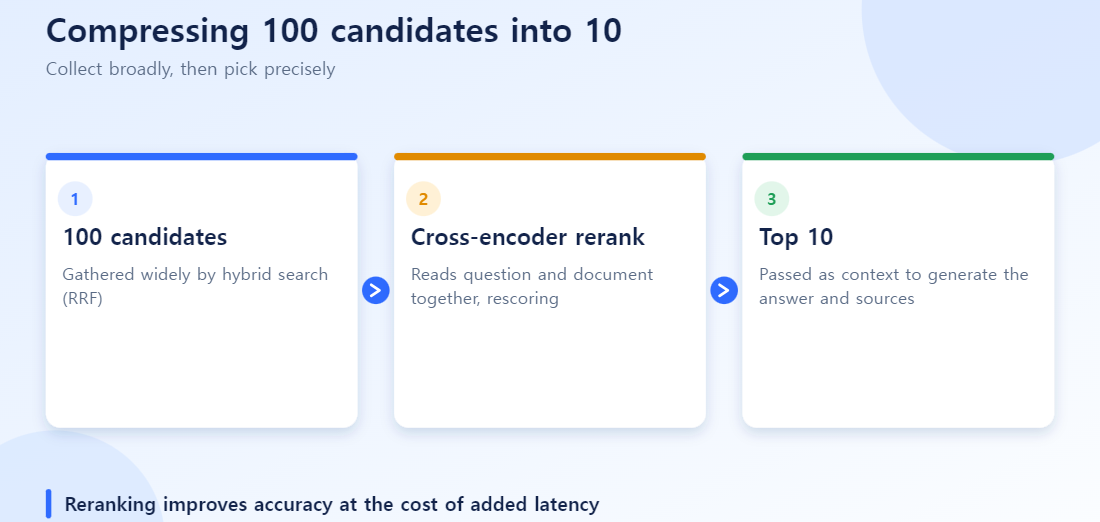
6. Reranking — Compressing 100 Candidates Down to 10
The embedding model used for hybrid search (a bi-encoder) vectorizes the question and each document separately and compares them. The reranking model, by contrast, is a cross-encoder — it feeds the question and a document in together as a pair and computes relevance directly. This is far more accurate but much slower, so it’s only applied to the wide candidate pool (100), not the full corpus.
# Hosted API (Cohere Rerank)
resp = co.rerank(model="rerank-v3.5", query=query, documents=docs, top_n=10)

# Open-source alternative — run locally
from sentence_transformers import CrossEncoder
reranker = CrossEncoder("BAAI/bge-reranker-v2-m3")  # multilingual, can run on CPU
scores = reranker.predict([(query, doc) for doc in docs])
For an internal-manual environment where Korean and English are mixed, the multilingual bge-reranker-v2-m3 is a practical choice. Reranking alone is reported to improve retrieval quality metrics (NDCG@10) by 5-15 points.[6]
7. Assembling Context and Generating the Answer — Keeping Citations
When you feed the top-N reranked chunks into the LLM prompt, including the metadata saved back in step 3 (source URL, section title) lets you surface citations in the answer.
context = "\n\n".join(
    f"[Source: {c.title}]({c.source_url})\n{c.text}" for c in top_chunks
)
prompt = f"""Answer using only the document content below. If there's no basis for an answer, say you don't know.

{context}

Question: {question}"""
Explicitly instructing the model to say “I don’t know” when there’s no grounding, and requiring it to return source links alongside the answer — these two moves are the most basic, practical levers for reducing hallucination and keeping answers verifiable.
Operations — How to Measure Quality
This pipeline isn’t something you build once and forget — to keep checking quality over time, teams use evaluation frameworks like RAGAS.[7] The retrieval side is measured with Recall@k (whether the right evidence lands in the top k), MRR, and Context Precision; the generation side is measured with Faithfulness (whether the answer’s claims are actually backed by the retrieved context). Comparing these metrics before and after changing chunk size or the reranking model is far safer than tuning by feel.
Is It Accurate to Call This “LangChain-Based”?
The architecture pattern itself isn’t tied to any particular framework. The chunking → embedding → hybrid search → rerank → generate pipeline can be built the same way without LangChain, or with a different framework like LlamaIndex or Haystack.[8] For “LangChain-based” to be an accurate description, the bar is whether you actually used LangChain’s components — ConfluenceLoader, TextSplitter, MultiQueryRetriever, EnsembleRetriever, Chain — to orchestrate the pipeline, as in the code above. If most of the components were built by hand or with a different framework, “a custom-built RAG pipeline” is the more accurate description.
Langflow, covered in the next post in this series, is a visual builder built on top of LangChain — each node on the canvas maps directly to a LangChain LLM, Chain, or Retriever object, so if you assembled the pipeline in Langflow, calling it LangChain-based is accurate.[9] The next post rebuilds this exact pipeline as Langflow components, and covers what stays low-code versus what still needs custom code.
Takeaways
- Keep ingestion (collect → chunk → dense/sparse index) and query (expand → hybrid search → rerank → generate) as separate, independently managed flows.
- Start chunking at 1024-token chunks with 128-token overlap; for wiki-style documents, apply header-based splitting first.
- Combine hybrid search results with RRF, and compress with a cross-encoder reranker from 100 candidates down to 10.
- “Chunking the question” usually refers, in practice, to multi-query expansion or query decomposition.
- Whether something is accurately “LangChain-based” comes down to whether LangChain’s loaders, splitters, retrievers, and chains were actually used to orchestrate the pipeline.
- The next post covers assembling this same structure visually in LangFlow — see the full series index.
References
- LangChain Docs, “ConfluenceLoader”
- RAGStack Docs, “Splitting”
- LangChain GitHub, “MarkdownHeaderTextSplitter discussion”
- Qdrant Docs, “BM25”
- Haystack Cookbook, “Sparse Embedding Retrieval”
- Qdrant Docs, “Hybrid Queries”
- Cohere Docs, “Rerank”
- DEV Community, “RAG Series: Query Optimization”
- Prem AI, “RAG Evaluation Metrics & Frameworks 2026”
- Towards Data Science, “Advanced RAG Retrieval: Cross-Encoders and Reranking”
- n8n Blog, “LlamaIndex vs LangChain”
- IBM, “What is LangFlow?”