
Who This Article Is For
This is for data engineers evaluating or just starting on Foundry, or anyone who’s heard plenty about the Ontology but is curious how data actually gets in before any of that. If you’ve worked with ERP or internal system integrations, comparing this against familiar concepts like ETL and connectors will help it click faster.
Introduction
Before talking about the Ontology or AIP, there’s something worth covering first: how company data actually gets into Foundry in the first place, and how it gets refined into the raw material the Ontology is built from. Palantir groups this under an area called “Data Integration.” It overlaps with what people usually call ETL/ELT, but the scope is broader. This article covers the flow from where data connects into Foundry, through the pipeline, to where it comes out refined.
Two Axes: Data Connection and Data Pipeline
Foundry’s data-integration area splits broadly into two axes.
- Data Connection: setting up the connection between Foundry and an external system (database, SaaS, file storage, API, etc.), and ingesting or exporting data through resources like agents, sources, and sinks.
- Data Pipeline: processing and transforming incoming source data — structuring it into the Ontology, or turning it into the curated dataset that analytics and machine-learning workflows are built on.
How you build a pipeline also splits by user skill level: Pipeline Builder, a low-code tool non-technical users can assemble with point-and-click; code-based Transforms (Python/SQL/Java), for when you need complex logic or an external library; and HyperAuto, a higher-level automation layer that auto-generates everything from sync to Ontology mapping for specific source systems like SAP. That means a technical org doesn’t have to code every single pipeline by hand — and conversely, that you can still drop down to code wherever complex logic demands it.
Core Concepts You Need to Understand This Data Layer
A handful of concepts apply across Foundry’s data layer regardless of which pipeline tool you’re using. Rather than listing everything, here are the ones you’ll actually run into in practice.
- Dataset: the most basic unit in a pipeline. A wrapper around a collection of files, with permissions, schema, and version control all built in. Every change is recorded as a transaction, so you can reproduce the state at any given point in time.
- Branching and Build: a dataset’s branches and transactions map directly to Git’s branches and commits. A build runs only against a specific branch, which lets you isolate different users’ changes from each other — data is version-controlled the same way code is.
- Stream: a structure that carries the same versioning and permission model as a Dataset, but provides a low-latency view. Used when batch processing isn’t fast enough and you need something closer to real time.
- Change Data Capture (CDC): a pattern that only processes records created or changed since the last run. It lets you build an incremental pipeline instead of re-scanning all the data every time.
- Virtual Table: a pointer that lets you query a table on an external platform directly, without loading the data into Foundry first. It abstracts away the different storage formats each source uses.
What all of these share is a single underlying philosophy: treat data the same way you treat source code. Version control, branching, lineage tracking — concepts developers already know — apply directly to the data layer too.
How Data Connection Is Structured: Control Plane and Workers
Data Connection is the application that governs every connection between Foundry and an external system. Structurally, it splits into Foundry’s control plane and a worker layer that actually moves the data. Define a source or sink, and Foundry hands it off to a worker as a job; the worker connects directly to the external system to read or write data.
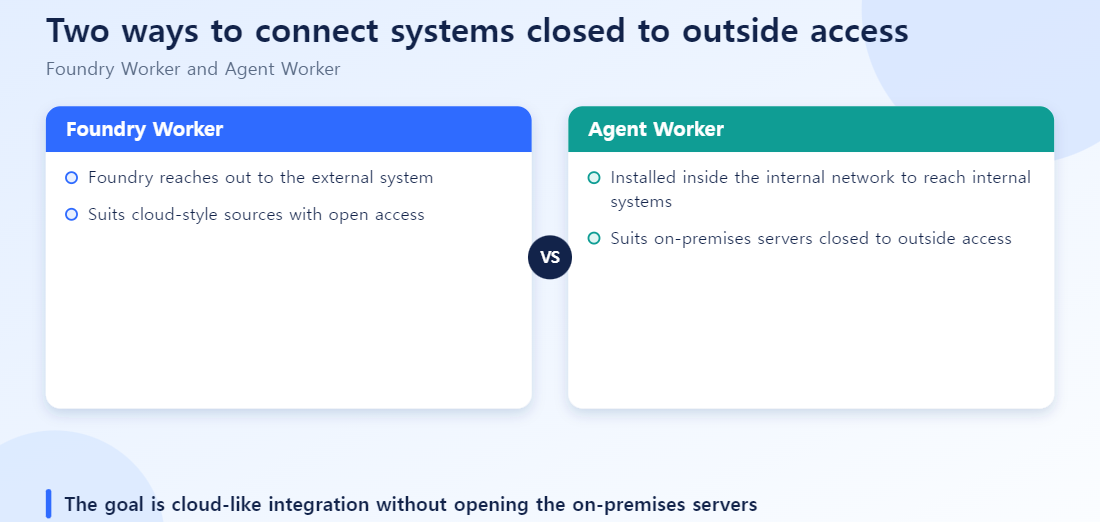
There are two kinds of workers.
- Foundry Worker (cloud-hosted): runs in an environment Palantir manages, suited to systems reachable over the public internet or a pre-approved path.
- Agent Worker (hosted in the customer’s environment): installed inside the customer’s on-premises or private VPC, used to connect to isolated systems (internal databases, APIs) with no direct external access. It’s designed to work using outbound connections only, so you never have to change the customer network’s inbound firewall policy.
This structure matters in practice because it lets you manage “what security cares about” separately from “what the data team needs.” Sensitive configuration — credentials, network access — stays under central control, while individual teams get delegated operating permissions only over the sources and sinks they actually use. It’s what makes a federated security model possible.
Choosing a Pipeline Approach
Deciding between the three pipeline-building approaches (Pipeline Builder, code-based Transforms, HyperAuto) comes down to these practical criteria.
- Is the source system a standardized ERP like SAP? If an automation layer like HyperAuto supports it, it can auto-generate most of the path from sync to Ontology mapping, getting you to an initial build fast.
- Is the logic just simple filtering, joining, or aggregation? Pipeline Builder is enough. Its advantage is that any team member can look at the screen and understand the flow.
- Are there complex conditional branches, or do you need an external library? Drop down to code-based Transforms. Even here, the whole team doesn’t need to switch to code — isolating just the complex part into code keeps maintenance easier.
- Is the source system isolated inside an internal network? Agent Worker is required — Foundry Worker simply can’t reach it.
Common Failure Patterns in Practice
- Picking the wrong worker type and stalling out in security review: it’s common to try connecting an internal-network system with a Foundry Worker, run into a requirement to open an inbound firewall rule, and get blocked in security review. Check the source system’s network location first, and pick the worker type based on that.
- Everyone working on master with no dataset branches: when multiple people modify a pipeline on the same branch simultaneously, their changes collide. Build the habit of isolating scope by branching per feature or task. Note that unlike Git, Foundry’s dataset branches don’t support merging between branches — once work is done, you fold the validated logic back into a build on the master branch instead.
- Reprocessing all the data every time with no CDC: as data volume grows, a pipeline that does a full scan every run sees its processing time balloon. If the source supports incremental processing, build CDC into the design from the start.
In Practice: Installing an Agent Worker
For an isolated SAP system, the typical sequence is:
- Install the Agent Worker inside the customer network, on a segment that can reach the SAP server. It is a lightweight agent binary.
- Register the outbound connection: the Agent Worker only opens an outbound connection to the Foundry control plane. The firewall rule is “allow this outbound port” and no inbound rule is needed.
- Configure the source connection: register the SAP tables or RFC targets as a connection in the Foundry console.
- Choose CDC or batch scans based on the data. For high-volume transactional data with frequent changes, CDC usually wins.
- Verify the dataset load by branch and build, then hand off to the pipeline (transform) stage.
For the security team, step 2 is what matters. Frame it as “we only need one outbound connection from inside” rather than “open an inbound port”, and approval comes much faster.
Foundry Worker vs. Agent Worker
| Aspect | Foundry Worker | Agent Worker |
|---|---|---|
| Where it runs | Cloud (Foundry side) | Inside the customer network |
| Connection direction | Foundry connects to the target system | Internal network connects out to Foundry |
| Best for | Systems that allow external access | Closed networks and firewalled systems |
| Setup difficulty | Low | Requires installation and firewall coordination |
Wrapping Up
In short, data integration in Foundry isn’t just “moving data around” — it’s the layer that handles both the connection point where data comes in (Data Connection) and the pipeline that refines it (Pipeline), inside one system with version control and permissions built in. The Ontology sits on top of this, and generative AI features like AIP sit on top of that in turn. For AI to actually “understand” company data, where that data came from and how it was refined has to be sorted out first — and that’s exactly the layer this article covers.
Reference: Palantir Foundry official documentation — Data Integration
Six checks before starting an air-gapped integration
- Have you confirmed with security whether access is blocked because of direction (inbound blocked) or full isolation?
- Have you defined checkpoints to tell a Connection (ingest) problem from a Pipeline (transform) problem?
- Does the source use a standard schema (for example ERP), so you can judge whether mapping can be automated?
- Is it clear who operates and patches the components installed inside the network?
- Have you listed and gotten approved the outbound destinations the firewall must allow?
- Have you decided who detects integration failures and delays, and how (health checks, alerts)?
Quick answers
Q. With an Agent Worker, do I have to open inbound access from outside?
No. The worker installed in the internal network only opens connections outward, so it does not require inbound access — that is the key advantage. You still need to allow the outbound destinations on the firewall.
Q. Isn’t writing everything in Code Transforms more flexible?
It is more flexible but slower to start. For standardized ERP data, start quickly with automated mapping and add code only for the exceptions.
Q. What should I separate first when an integration fails?
Whether the problem is in getting the data in or in transforming it afterward. Mixing the two makes root-cause analysis longer.
What to Read Next
For how refined data actually gets stored, see How Foundry Actually Stores Data. For the specifics of building a pipeline through the GUI and through code, see Foundry Data Pipelines: Pipeline Builder vs. Code Repository.