→ See the full AI Agent Implementation series
Why build the same thing twice
The Part 1 pipeline was pure code — changing a single parameter meant opening the code, editing it, and redeploying. If someone other than me has to operate this pipeline — say, a business user wants to tune the chunk size or the number of reranking candidates themselves — a code-first structure isn’t very accessible. Rebuilding the same pipeline in a low-code tool like Langflow makes it obvious exactly where that tradeoff shows up.
Architecture comparison
| Stage | Part 1 (LangChain code) | Langflow |
|---|---|---|
| Ingestion | Direct ConfluenceLoader call |
Same loader wrapped in a Custom Component |
| Chunking | RecursiveCharacterTextSplitter |
Split Text component (same parameters, exposed as fields) |
| Embedding (dense) | Direct FastEmbed call | Embedding Model component |
| Embedding (sparse) + RRF fusion | Custom function | No native component → implemented as a Custom Component |
| Vector storage | Qdrant client | Vector Store component (Qdrant supported) |
| Reranking | Direct Cohere/bge-reranker call | Reranker component (limited to supported providers) |
| Deployment | Wrapped manually in FastAPI | Flow as API exposes an endpoint immediately |
As the table shows, about half of the pipeline is just dragging components onto a canvas and wiring them together — and the other half, especially the hybrid-search fusion logic, still has to fall back to code. Here’s the stage-by-stage breakdown.
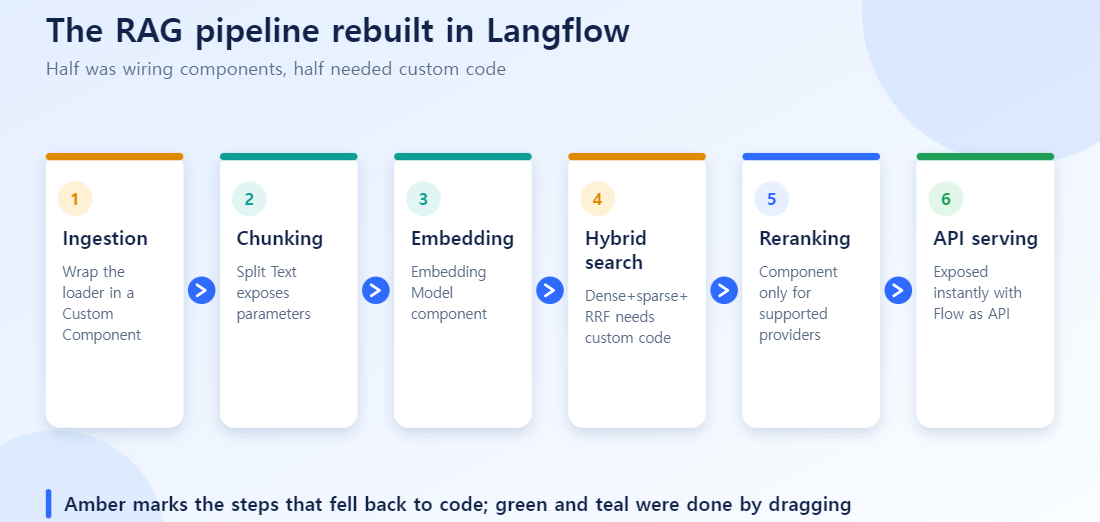
1. Ingestion — reusing the existing loader in a Custom Component
Langflow doesn’t ship a built-in Confluence component. Instead, I dropped the same ConfluenceLoader call from Part 1 into a Custom Component block. Langflow’s custom components only require the input/output types to match Langflow’s own schema (Data, Message, etc.) — the internal logic is plain Python, so most of the existing code carried over as-is.
from langflow.custom import Component
from langflow.io import Output
from langflow.schema import Data
from langchain_community.document_loaders import ConfluenceLoader

class ConfluenceIngestComponent(Component):
    display_name = "Confluence Ingest"
    outputs = [Output(display_name="Documents", name="docs", method="load_docs")]

    def load_docs(self) -> Data:
        loader = ConfluenceLoader(url=self.confluence_url, token=self.api_token)
        docs = loader.load(space_key=self.space_key, include_attachments=True, limit=50)
        return Data(data={"documents": docs})
The incremental-sync logic (comparing version.when) also stayed inside this component unchanged. All Langflow gives you here is “drop this component on the canvas and wire it to the next one” — the sync strategy itself still has to be designed by hand.
2. Chunking — Split Text exposes parameters as fields
This stage is a clear win for low-code. The Split Text component exposes chunk_size, chunk_overlap, and the split unit (character/token/separator) directly as UI fields. The values I had hardcoded in Part 1 (chunk_size=1024, chunk_overlap=128) just became field inputs.
The practical payoff: no deploy pipeline needed every time a value changes. If a business user says “answers keep missing context lately,” they can bump chunk_overlap on the canvas and test it immediately, no developer required.
3. Embedding and hybrid search — where low-code hits its limit
Dense embedding is handled cleanly by the Embedding Model component. The problem is sparse embedding and RRF (Reciprocal Rank Fusion).
Langflow’s Vector Store component is built around dense vector search, and querying dense+sparse together and merging with RRF isn’t exposed as a native component. Some vector-DB integrations (e.g. Astra DB) ship hybrid search plus a reranker as a preset combo, but for Qdrant I had to reimplement Part 1’s RRF fusion query as a Custom Component.[1]
class HybridSearchComponent(Component):
    display_name = "Hybrid Search (Dense+Sparse RRF)"

    def search(self) -> Data:
        dense_hits = self.qdrant.query(collection, using="dense", query=dense_vec, limit=50)
        sparse_hits = self.qdrant.query(collection, using="sparse", query=sparse_vec, limit=50)
        fused = reciprocal_rank_fusion(dense_hits, sparse_hits, k=60)
        return Data(data={"results": fused[:10]})
In other words: if hybrid search isn’t a requirement, Langflow’s built-in components are enough for a simple RAG setup. But to carry over the level of retrieval sophistication from Part 1, some code always survives. What low-code removes is boilerplate — wiring, logging, API serving — not the core logic that actually determines retrieval quality.
4. Reranking — the component exists, but provider support is limited
A Reranker component exists, but only for a fixed list of supported providers. Self-hosting Part 1’s open-source bge-reranker meant wrapping the HTTP call in another Custom Component. If you use a provider that’s already on the supported list (Cohere, for instance), this step is just filling in a few fields — so which reranker you use is the real deciding factor for whether this stays low-code.
5. Flow as API — deployment genuinely gets easier
Once the pipeline was wired up, Flow as API immediately exposed a REST endpoint.[2] In Part 1 I had to write a separate FastAPI wrapper by hand; here Langflow clearly saved time. An internal chatbot UI or a Slack bot just calls this endpoint — so the last step of “connecting the pipeline to production” was unambiguously easier in the low-code version.
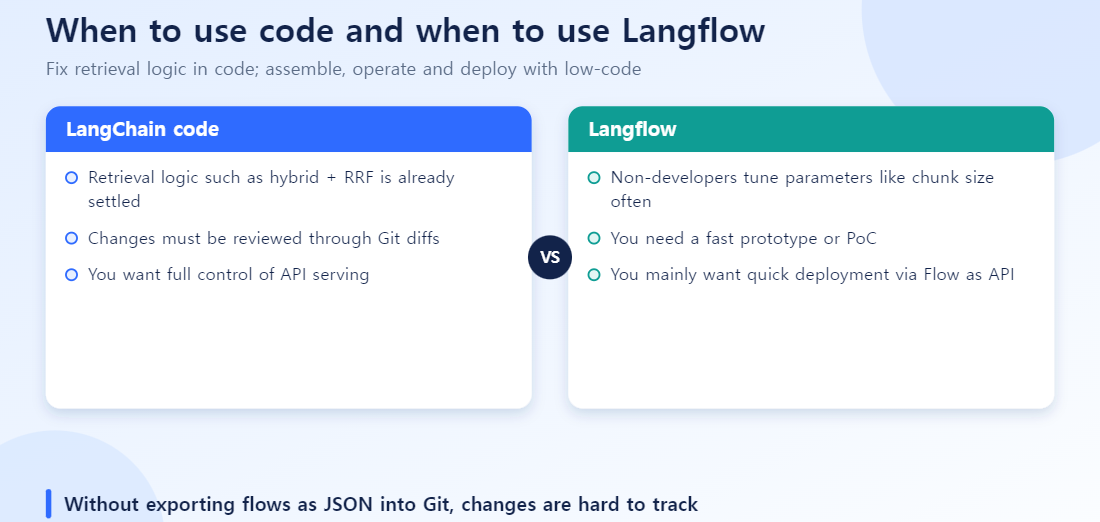
Code vs. low-code — when to use which
| Criterion | LangChain code | Langflow |
|---|---|---|
| Retrieval logic is already sophisticated and fixed (hybrid + RRF, etc.) | Good fit | Needs a custom component workaround |
| Non-engineers need to tune parameters often | Requires a deploy | Adjust instantly on the canvas |
| Fast prototyping, PoC | Higher setup cost | Fast |
| Want full control over API serving | Good fit | Flow as API is often enough |
| Version control (reviewable Git diffs) | Natural fit | Flow JSON diffs are hard to read |
Common mistakes
- Trying to force everything into low-code: if you already have validated logic like hybrid search, moving it into a Custom Component beats contorting it to fit a native one.
- Managing Flow JSON only through the UI, with no version control: Langflow flows export as JSON. If you don’t commit that to Git, there’s no way to track who changed what on the canvas.
- Designing before checking provider support: for components like rerankers or vector DBs, whether integration already exists is what really determines the workload — check the supported list before you start drawing the pipeline.
Takeaways
- The pipeline’s skeleton (ingestion → chunking → embedding → search → reranking → generation) maps to Langflow components for the most part.
- But Part 1’s level of hybrid search / RRF fusion isn’t achievable with native components alone — it has to drop into a Custom Component (Python).
- API deployment, on the other hand, is clearly faster in Langflow.
- Conclusion: the most realistic setup was a hybrid — lock down the retrieval logic in code, and handle assembly, operations, and deployment in low-code.
Next: To adapt the retrieval model itself to your data, continue with RAG Fine-Tuning with Synthetic Queries and Hard Negatives.