
Throw everything into one box in a warehouse, and you’ll have to search the whole box just to find what you need — the same is true for ontology design
Nobody gets ontology design right on the first try
Most ontology work starts the same way: “let’s just get the data in first.” The problem is that the Object Types pile up like a disorganized warehouse — nobody knows what’s where, or how many places the same thing is stored in duplicate.
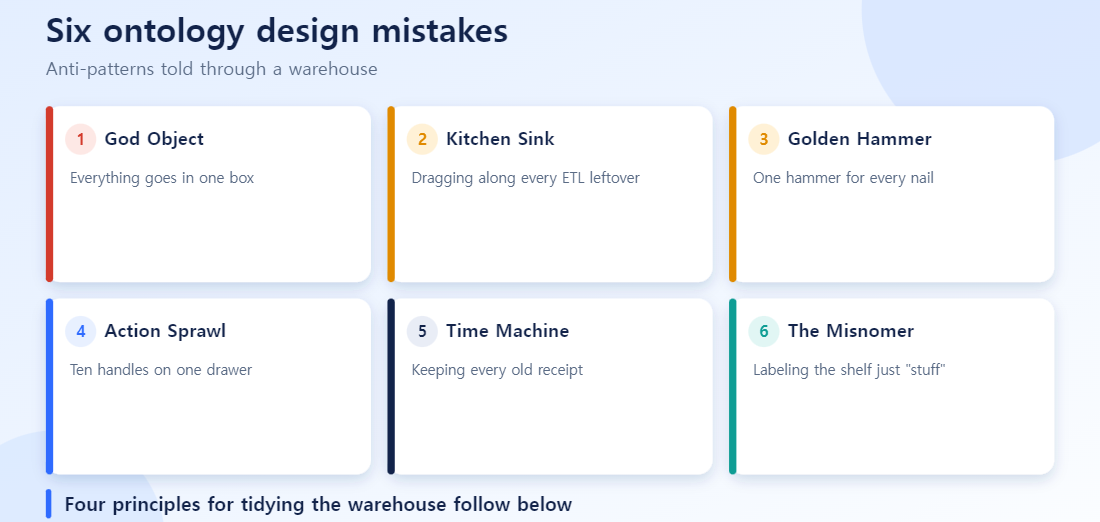
Palantir’s official documentation catalogs these mistakes as eight anti-patterns.[1] We already covered “the same customer called by three different names” in a separate article, so here we’ll walk through the other six that show up constantly in practice.
Mistake 1: Everything goes in one box — The God Object
Imagine a warehouse box labeled “Assets” that holds equipment, software licenses, real estate documents, and financial instrument contracts all at once. It looks convenient — open one box and everything’s there — but finding anything specific means digging through the whole box.
That’s the exact example the official docs use: cramming equipment, software licenses, real estate, and financial products into a single Asset Object Type.[1] This is the God Object. The fix is splitting each into its own Object Type, and modeling shared attributes (like “is this depreciable”) through an interface instead.[1]
Mistake 2: Dragging along ETL leftovers — The Kitchen Sink
Nobody moving house keeps the shipping label and tape scraps from the box. But this happens constantly in ontology work. Migrating CRM data often drags along ETL processing metadata like _crm_extracted_at and _crm_batched_at as if they were real attributes.[1]
These fields mean nothing to a business user — they’re just technical residue from the source system. The official principle is clear: only deliberately curate attributes that carry clear business or technical value.[1]
Mistake 3: Hammering everything with the same tool — The Golden Hammer
Even a well-organized person can wreck a warehouse by using the wrong tool — a screwdriver where a nail is needed, a hammer where a screw should be turned. In ontology work, this shows up as confusing Action Types with pipelines.
The official docs cite implementing bulk batch processing as an Action Type, or the reverse — handling decisions that need human judgment through an automated pipeline.[1] The rule: Action Types for human decisions, pipelines for automated bulk transformations.[1] Pick the tool that matches the nature of the work.
Mistake 4: Ten handles on one drawer — Action Sprawl
A drawer with ten handles is more confusing than helpful. In ontology terms, this is creating separate actions for “update employee name,” “update email,” and “update department” individually.[1]
In practice, name, email, and department changes usually happen together as part of one real business operation. The official fix: bundle related changes into a single business-operation-level action.[1]
Mistake 5: Keeping every old receipt on the shelf — The Time Machine
Some teams treat every revision of a contract — v1, v2, v3 — as a separate object sitting side by side on the shelf. The official docs call modeling each version of an entity as a separate object the Time Machine anti-pattern.[1]
The fix is keeping the contract as a single object, while managing history through a linked history Object Type or time-series attributes.[1] Treat each version as a new entity, and answering “what’s the currently valid contract?” means hunting for the latest version every single time.
Mistake 6: Labeling the shelf just “Stuff” — The Misnomer
Label a warehouse shelf “Item,” “Thing,” or “Type,” and nobody will know what’s on it later. In ontology terms, this is using vague names like Item, value, type, or date.[1] The official docs recommend specific, human-readable names like Product, monetaryValue, or orderPlacedDate instead.[1]
So how do you actually organize the warehouse — 4 design principles
The official documentation lays out design principles in priority order to avoid the mistakes above.[2]
- Model reality, not the source data. Instead of copying a CSV row as-is (an “OrderData” object mixing customer name, email, and product SKU together), separate order, customer, and product into distinct entities.[2]
- Refactor on the third repetition. The same structure appearing twice might be coincidence — by the third time, it’s a pattern. Consolidate it or abstract it through an interface immediately.[2]
- Protect the core, keep it open for extension. Instead of continuously bolting new attributes onto an existing Object Type, extend through a separate linked Object Type or interface. If equipment suddenly needs certification data, don’t touch
Equipmentitself — link a newEquipment Certificationobject instead.[2] - Favor composition over deep inheritance. When something has multiple natures at once (a building that’s also a schedulable resource, for instance), don’t build a deep inheritance chain — combine multiple interfaces like
BuildingandSchedulableResourceinstead.[2]
The official docs are explicit that these are guidelines, not absolute law.[2] Under deadline pressure, implementing a reasonable interim solution with a documented improvement plan is fine — but naming, semantic clarity, and security are the things not worth compromising on.[2]
FAQ
Q. Do I need to fix all of these anti-patterns right now? No. The official docs acknowledge real tradeoffs. Compromising on some points for performance or deadlines is fine, but naming conventions and semantic clarity are much harder to fix later, so it’s worth getting those right early.
Q. How do I know if I have a God Object? Ask yourself: “does this Object Type represent two or more genuinely different things in the real world?” If you’re calling both equipment and software licenses “Asset,” you already have a God Object.
Q. How do I tell Kitchen Sink metadata from metadata I actually need? The test is whether you can explain the attribute’s meaning to a business user. “When this record was batch-processed” means something to an engineer, but nothing to the person actually using the data.
References
[1] Palantir, Ontology design: Anti-patterns, Foundry official documentation.
[2] Palantir, Ontology design: Best practices, Foundry official documentation.
Design Review Checklist
Before deploying a new Object Type, run the anti-patterns above as a checklist to prevent a lot of rework.
| Question | Related anti-pattern |
|---|---|
| Does this Object Type bundle different kinds of entities together? | God Object |
Are internal ETL fields (_extracted_at etc.) exposed as-is? |
Kitchen Sink |
| Does another team already have an Object Type for the same concept? | Duplicate naming |
| Did you reconfirm Link Type cardinality with the business? | Wrong cardinality |
| Is a calculation defined once on the Object Type rather than separately on each screen? | Duplicated calculation logic |
| Were permissions checked before deployment, not added afterwards? | Missing permission design |
Insert this table into the review step that approves new Object Types and a good share of design mistakes get filtered out before reaching production. Back to the warehouse analogy: it is the habit of double-checking which shelf something belongs on before putting it in.