
Why You Need an MCP Server
There are broadly two ways to let an agent like Claude reference data from your internal systems.
- Copy-paste every time — a person looks up the data and pastes it into the prompt. Fine for one-off tasks, but it doesn’t scale to repeated work or anything that needs fresh data.
- Connect directly with an MCP server — the agent calls a tool itself whenever it needs data. Build it once, and every future conversation and task can reuse it.
MCP is the protocol that standardizes this “direct connection.” Instead of building a bespoke integration for every internal system, you build one server that follows the MCP spec, and it works identically across every MCP-capable client — Claude Code, Claude Desktop, and others.
What an MCP Server Can Expose
An MCP server can expose three broad categories of capability to a client like Claude.
| Component | Role | Example |
|---|---|---|
| Tool | A function the agent can call and execute | “Look up a ticket in the internal ticketing system” |
| Resource | Data the agent can read | “Today’s sales report file” |
| Prompt | A predefined prompt template | “Summarize the weekly report in this format” |
In practice, Tools are almost always where people start. The fastest path is a single function that “calls an internal API and returns the result.”
A Working Example — A Minimal Server Exposing One Tool
Using the Python MCP SDK, here’s a server with a single Tool that calls an internal inventory-lookup API.
from mcp.server.fastmcp import FastMCP
import requests

mcp = FastMCP("inventory-server")

@mcp.tool()
def get_stock(sku: str) -> str:
    """Look up internal stock quantity by SKU."""
    resp = requests.get(f"https://internal-api.example.com/stock/{sku}")
    resp.raise_for_status()
    data = resp.json()
    return f"{sku} stock: {data['quantity']} units"

if __name__ == "__main__":
    mcp.run()
To connect this server to Claude Code, register the launch command in your config file.
claude mcp add inventory-server -- python inventory_server.pyOnce connected, Claude answers questions like “how much stock is left for SKU A123?” by calling the get_stock tool on its own. From this point on, nobody has to query the API by hand.
What to Watch For — Permissions and Side Effects
Before connecting an MCP server to internal systems, check these two things first.
- Separate reads from writes — mixing read-only tools and data-mutating tools on the same server raises the risk that the agent calls a “write” tool by accident while intending a lookup. Keep write operations as clearly distinct tools, and add a confirmation step wherever possible.
- Handle authentication on the server side — never pass API keys or tokens to Claude through the prompt. The MCP server itself should manage credentials via environment variables or its own config, while the agent only ever deals with tool names and parameters.
Tools with write operations connect directly to the agent-autonomy problem covered in Part 1. For anything hard to undo — deletion, payment, sending — it’s safer to either not build the Tool at all, or design it to always require human confirmation.
Minimizing Permissions per Tool
Separating reads from writes is not enough. In practice you should also limit the scope of system permissions each tool can reach.
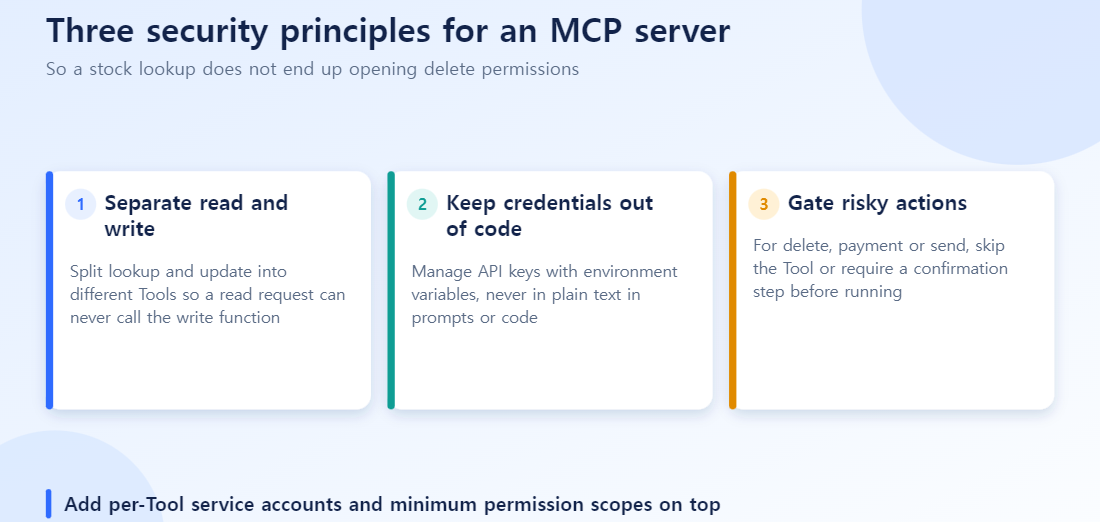
- Use a separate service account per tool: the account behind
get_stock_levelshould have read-only access to the inventory table, and nothing else. “We didn’t write a write function, so it’s safe” is weaker than making the credential itself incapable of writing. - Write precise tool descriptions: Claude decides when to call a tool from its
description. Replace “reads or updates stock” with “Returns current stock quantity only. This tool does not modify data.” - Log every tool call: record which tool was called, when, and with what parameters, so incidents can be traced quickly.
Permission Design Checklist
| Check | Question |
|---|---|
| Tool separation | Are reads and changes separate functions? |
| Service account scope | Does the credential hold only the permissions this tool needs? |
| Hard-to-reverse actions | Do deletes, payments and sends require an approval step? |
| Logging | Can you trace who did what, and when? |
| Description clarity | Does the description clearly bound what the tool does? |
Wrapping Up
- MCP is the protocol that standardizes how an agent connects to outside systems.
- A server can expose three things — Tool (execute), Resource (read), and Prompt (template) — and in practice, teams usually start with Tools.
- A minimal setup is just one function wrapped with the MCP SDK and registered with a client.
- Separating reads from writes, and handling authentication server-side, should be part of the design from day one.
AI Agent Series — Full Table of Contents
- (1/6) What Is an AI Agent?
- (2/6) Prompt Engineering vs. Context Engineering
- (3/6) What Is Harness Engineering?
- (4/6) Agentic Engineering and the PH-AH Loop
- (5/6) Setting Up an AI Agent Practice Environment
- (6/6) Hands-On Practice With 4 AI Agent Concepts
This article isn’t a direct sequel to that 6-part series, but it pairs well with it: What Is a Multi-Agent System? Getting Agents to Collaborate
Six checks before connecting an MCP server to internal systems
- Have you listed which tools are read-only and which cause changes?
- Did you separate change-causing tools into a separate server with separate approval?
- Did you grant each tool only the minimum permissions it needs, rather than giving a service account everything?
- Do you validate inputs (item code, quantity) and limit allowed ranges?
- Do you log calls by who, when, and what?
- Did you avoid putting the prototype-level minimal example straight into production?
Quick answers
Q. Is it fine to start with read-only tools?
It is a good start. Validate value with read-only access first, then decide whether write features are truly needed and add them with risk controls.
Q. Why not put the edit feature on the same server for convenience?
Not recommended. On the same server, a read request can become a path that opens deletion rights. Keep reading and changing separate.
Q. Does simply building an MCP server make AI use it safely?
No. It provides a connection standard; permissions and validation are the server designer’s responsibility. Telling the model in a prompt not to do something is not a security control.
Frequently Asked Questions
Q. Do I need to use Python?
No. Official MCP SDKs also exist for TypeScript and other languages — pick whichever fits your existing stack.
Q. Does this replace OMCP?
No — OMCP is a specific implementation built for connecting Claude to a Palantir Ontology. This article covers the general pattern for building any MCP server, of which OMCP is one example.