
“If a purchase order exceeds $5,000, it needs manager approval; below that, auto-approve.” Where do you even start turning a rule like that into a working workflow? Inside AIP, “AI builds it” actually splits into two layers: AI that helps you build the ontology and application, and AI that actually judges and acts inside a finished workflow. This post follows how those two layers connect, using purchase order approval as the running example.
Step 1 — Get a Skeleton Fast with AI FDE
An FDE (Forward Deployed Engineer) is the role that implements requirements directly in code. AI FDE takes the repetitive parts of that role and drafts them from a natural-language request.
For a purchase order approval case, you’d use it like this:
- Show AI FDE your ERP’s purchase order table and approver master table, and ask: “suggest candidate Object Types and Link Types between purchase orders and approvers.”
- In the Workshop app builder, say “build a screen showing purchase amount and approval status,” and it auto-generates a draft widget layout and data bindings.
The key point here: this AI-generated draft is “a starting point, not a finished product.” A human still has to verify whether the Link Type cardinality AI proposed is actually correct, and whether the naming follows your company’s naming strategy.
Step 2 — Assemble the Real Decision Logic with AIP Logic
Once the skeleton is ready, it’s time to turn “manager approval above $5,000” into an executable workflow.
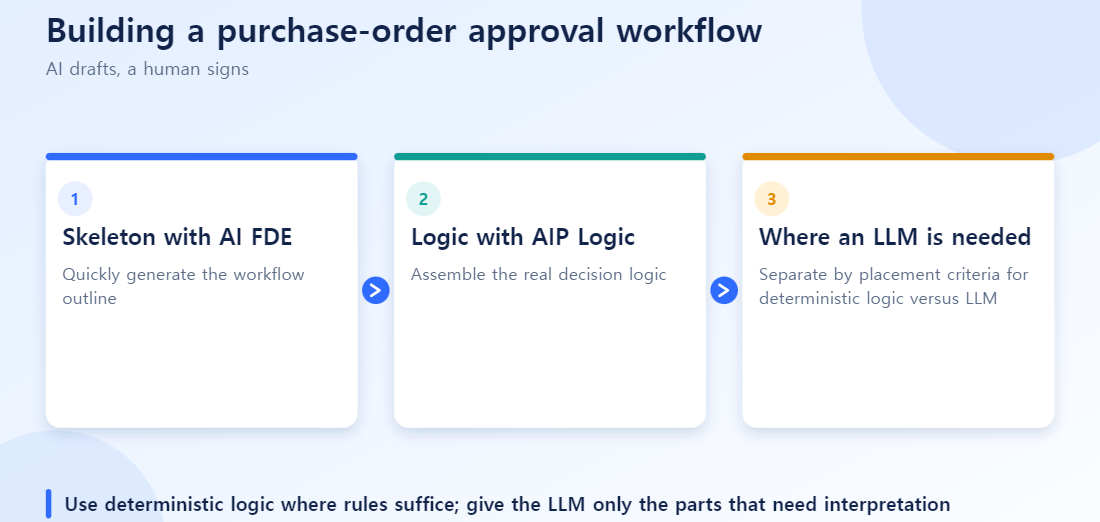
AIP Logic is a tool for integrating an LLM’s flexible reasoning into controllable business rules — visually combining non-deterministic LLM steps with deterministic logic blocks.
A purchase order approval workflow might look like this:
- Pull the purchase order amount from the Ontology (ontology-based data binding)
- Is the amount $5,000 or less? → branch deterministically with an If/Else block
- If it exceeds $5,000, an LLM block compares it against past similar purchases and generates an initial “is this unusually high?” review comment
- Send an approval-request notification to the manager (API call)
- Record the approve/reject result back to the Ontology
The key is step 3. A simple amount comparison is fully handled by If/Else — the LLM is placed only where actual judgment is needed, like “is this unusual or not.” The entire workflow is never handed over to the LLM wholesale.
AIP Logic also provides visual debugging that traces each step’s input/output, plus backtesting against historical data. Running the last 6 months of purchase order data through it before deployment lets you see how the workflow would actually have judged those cases.
Where the Two Tools Connect
Split by role: AI FDE prepares “what to work with” on a data basis, and AIP Logic executes “what to do with it.”
In practice, the sequence usually looks like this.
- Use AI FDE to quickly build out the Ontology and initial app structure
- Have a human review and revise the proposed schema and code
- Design the automation workflow in AIP Logic on top of the verified Ontology
- Build the skeleton with deterministic blocks, placing the LLM only at genuinely necessary judgment points
- Verify with backtesting before deployment
Step 3: Where Does the LLM Actually Belong?
“Is the amount over 5 million KRW?” is a number comparison, and If/Else handles it. An LLM becomes necessary for cases that rules cannot cleanly decide.
Say there is an exception: “urgent purchases are approved immediately regardless of amount.” When the memo field contains free text such as “urgent”, “ASAP” or “production may halt tomorrow”, deciding whether it counts as urgent is hard with regular expressions or simple conditions. Put an LLM at that point to classify the memo.
[Purchase order created]
   |
[Amount over 5M KRW?] --(deterministic branch)
   | No                     | Yes
[Auto-approve]        [Urgency stated in memo?] --(LLM judgment)
                         | No              | Yes
                  [Request manager approval]  [Urgent approval + notify manager afterwards]
Clear conditions such as amount comparisons stay in deterministic blocks; judgments that need natural-language interpretation go to the LLM. That narrows the place where the LLM can be wrong to one branch rather than the whole workflow, which makes validation and backtesting much easier.
Deterministic Logic vs. LLM: Placement Guide
| Judgment type | Example | Where it goes |
|---|---|---|
| Numeric comparison | Is the amount over 5M KRW? | Deterministic (If/Else) |
| State lookup | Is an approver already assigned? | Deterministic |
| Free-text interpretation | Does the memo describe an urgent situation? | LLM |
| Fuzzy classification | Which budget line does this expense belong to? | LLM (with a human re-check) |
Common Mistakes
Finalizing an AI suggestion without verification. A human must always re-check the direction and cardinality of a Link Type’s relationship. If AI proposes a 1:1 relationship between purchase orders and approvers when it’s actually 1:N — one approver handling many purchase orders — that error will affect the entire workflow down the line.
Handing deterministic logic to the LLM anyway. A simple condition like “is it over $5,000” is faster and more predictable as an If/Else. Use the LLM only where judgment is genuinely required.
Skipping backtesting and deploying straight away. Workflows that include an LLM have plenty of edge cases. Without a dry run against historical data, you’ll discover the workflow misbehaving on an unexpected case only after it’s already live.
Not distinguishing AI-drafted parts from human-designed parts. When something breaks later, if you can’t tell which parts were AI-drafted and which were designed by a person, tracing the root cause gets much harder. Make it a habit to keep a change history.
Six checks before putting an AI-built workflow into operation
- Did a person verify the cardinality of Object and Link Types the AI FDE proposed?
- Did you check names against the company’s naming strategy?
- Did you keep business rules such as approval thresholds as deterministic logic and use the LLM only where judgment is needed?
- Is it clear where a person signs off on AI judgments?
- Did you make test cases for boundary conditions (for example, exactly at the threshold)?
- Are the basis for judgments and the approval history kept as an audit record?
Quick answers
Q. Can I use the AI-generated draft as is?
A draft is a starting point. A person must verify that structure proposals match business reality and that names, relationships, and permissions match policy.
Q. If the rules are clear, don’t we not need an LLM?
Right. Clear rules such as amount thresholds are more stable as code. Limit the LLM to interpreting unstructured input or tasks like summarization that rules handle poorly.
Q. Doesn’t adding human approval reduce the value of automation?
Automating repetitive work while leaving accountable final decisions to people is generally safer. Adjust the scope of human approval by risk.
Frequently Asked Questions
Q. What’s the difference between AI FDE and AIP Logic?
AI FDE is a tool that supports the development process; AIP Logic is a tool that executes real work on top of a finished Ontology.
Q. Can I use the schema AI FDE proposes as-is?
Not recommended. You must review and revise it to confirm the business meaning is correct and it follows your company’s naming principles.
Q. Where should the LLM be placed in AIP Logic?
Avoid delegating the entire workflow to the LLM. It’s safer to place it selectively, only at points where natural-language understanding or complex judgment is genuinely needed.
Q. Are the Actions an AI agent executes safe?
They only run within the Ontology’s permission system and validation rules. For Actions with large financial amounts or high impact, it’s advisable to add an extra human approval step.