
I Get the Concept, But What Do I Actually Have to Define?
You’ve probably heard an Ontology described as “a map that translates a company’s reality into something software can understand.” But the moment you actually try to build one, you hit a wall: “Okay, so what do I actually need to define?” This article walks through the seven elements that make up an Ontology, all mapped onto a single story — a piece of equipment breaks down, and someone fixes it.
How Dataset Concepts Map to Ontology Concepts
Let’s start with the correspondence.
| Dataset concept | Ontology concept |
|---|---|
| Row | Object |
| Column | Property |
| Field value | Property value |
| Join | Link Type |
On top of that, an Ontology adds three more things: business-term-based metadata, field-level permission control, and Actions. It’s not just giving tables prettier names — it’s turning them into something you can act on.
The Seven Components, Told Through a Piece of Equipment
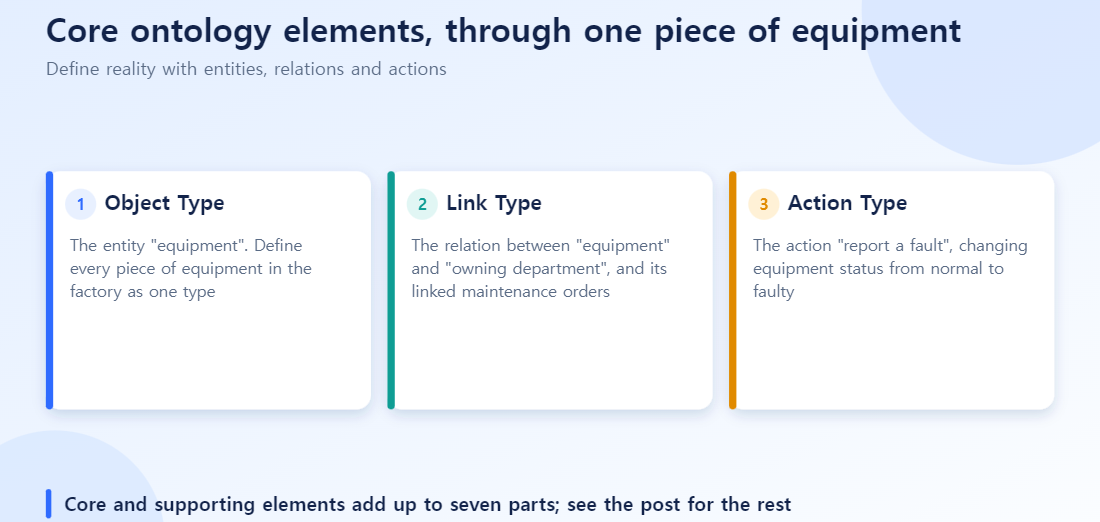
The Four Core Elements
Object Type — the “machine” itself. Every piece of equipment in your factory gets defined as one Object Type. People, equipment, orders — any real-world entity type is defined as an Object Type.
Link Type — the relationship between “machine” and “owning department.” This defines which department owns the machine and which maintenance order it’s tied to. A Link Type defines the relationship between two Object Types.
Action Type — the act of “reporting a breakdown.” Changing a machine’s status from “normal” to “broken” — that’s an Action Type. It defines an operation that creates, updates, or deletes data.
Functions — “automatically calculate the repair cost.” Once a breakdown is reported, you need logic that estimates repair cost and time based on similar past incidents. Functions is where that business logic (code) runs.
The Three Supporting Elements
Property — an individual data field on the machine. Machine name, installation location, last inspection date — these are the individual fields an Object Type holds.
Shared Property — an attribute shared across multiple Object Types. For example, a “managing department code” might apply not just to machines but to vehicles, facilities, and other Object Types too. A Property used in common across multiple Object Types is a Shared Property.
Role — “who’s allowed to report a breakdown.” A field technician should be able to report a breakdown, but only an administrator should be able to delete that report. Role is the unit that governs both Action execution and data access permissions.
How to Split It in Practice
The semantic elements (Object, Property, Link) define “what the company’s reality is.” The dynamic elements (Action, Functions) define “how that reality can be changed.” In terms of the machine story: the first three define “what the machine is and who owns it,” and the last two define “what can be done when something happens to it.”
Action Type and Functions: The “Moving” Part of an Ontology
Action Type collects data from the people running the organization and coordinates decision-making across existing systems. “Reporting a breakdown” isn’t a read-only lookup — it’s an act that changes state, and who approved it and when it ran are folded into the system as an audit log.
Functions is where you write business logic of arbitrary complexity. Everything from a simple calculation like “estimate repair cost” to a complex conditional branch like “if this machine breaks down for the second time within three months, automatically raise its priority” gets handled here.
The Applications Built on Top of an Ontology
Once you’ve designed a solid equipment Ontology, you can layer different applications on top of it for different purposes.
| Application | How it’s used in the machine story |
|---|---|
| Object Views | Click on a machine to see its properties, owning department, and recent maintenance history in a single screen |
| Object Explorer | Freely explore and filter, like “find every machine that broke down this month” |
| Quiver | Analyze breakdown frequency per machine or maintenance cost per department statistically |
| Workshop | Quickly build the low-code “report a breakdown” screen field technicians use |
| Slate | Assemble a polished, custom UI showing equipment status for executive reporting |
| Map | Visualize the locations of equipment scattered across multiple factories on a map |
The key point: once you’ve designed the Ontology, you don’t have to rebuild exploration, analysis, and operational applications from scratch every time. You just swap in the right application for the job. This is how Palantir’s “economies of scale” actually plays out in practice.
In What Order Should You Design the Seven Components?
A common mistake on a first ontology is trying to define all seven at once. There is an order.
- Settle the Object Type first. Define the core entity, such as equipment. If it wobbles, everything else wobbles.
- Draw relationships with Link Types. Define equipment-to-department, equipment-to-work-order, and so on. Pin down cardinality (1:1, 1:N, N:M) here to reduce rework later.
- Define the change points with Action Types. “Report failure” and “approve maintenance” are where state changes.
- Add derived calculations with Functions. Values that come from computation rather than storage, such as repair cost estimates, are defined here.
- Business metadata and permissions travel together from the start. Property names, descriptions and access rights should be filled in when the Object Type is created, not batched at the end.
Reverse the order (for example, building Actions first and adjusting Object Types later) and every change to the structure an Action references ripples into rework.
Common Design Mistakes
| Mistake | Result |
|---|---|
| Splitting Object Types too finely | Even simple lookups need several Links, raising complexity |
| Setting Link Type cardinality carelessly | Changing 1:N to N:M later forces rework on every screen and Action that references it |
| Leaving permissions to the very end | Sensitive information is found exposed only after screens ship |
| Not distinguishing Actions from Functions | Simple calculations become Actions and gain needless approval steps |
Summary
Why you use an Ontology is a question of concept. What you build it from is the domain of these seven components. Objects, Links, and Properties handle the semantic definitions; Actions and Functions handle the channel through which reality actually gets changed. Purpose-built applications stack on top of that foundation.
Frequently Asked Questions
Q1. What’s the difference between an Object Type and a Dataset? A Dataset is the cleaned data table a pipeline produces. An Object Type is that Dataset mapped onto a business concept. A single Object Type can reference multiple Datasets.
Q2. What kinds of cardinality does a Link Type support? Three: 1:1, 1:N, and N:M. You can also configure whether it’s one-directional or bidirectional.
Q3. When’s the right time to create an Action Type? It’s best to wait until Object Type and Link Type are stably defined. If you build Actions while the data structure is still in flux, you’ll end up rewriting your validation rules over and over.
Q4. What exactly does Functions do? It handles complex calculations or conditional logic that Object, Link, and Action can’t handle on their own. It’s commonly used in Action validation logic or in the calculation formulas behind Workshop widgets.
Q5. What order should I design things in? Start with Object Type. Link, Action, and Functions design all follow from Object Type after that.
Q6. When should I start introducing Shared Property? The signal to introduce it is when you notice multiple Object Types repeatedly defining the same attribute separately (e.g., managing department code, employee ID). You don’t need to force it in during initial design.