
The evaluation section of this article — specifically the points about automatic updates occasionally breaking things, and support responsiveness compared to local vendors — is the author’s personal, first-hand opinion, not something drawn from official sources. The description of Apollo’s architecture and features is based on Palantir’s official documentation.
What Apollo Does
Palantir Apollo is the continuous delivery (CD) platform that automatically deploys and manages Palantir software (Foundry, AIP, and more) across multiple environments. It spans cloud, on-premises, and even air-gapped environments completely disconnected from the internet. Official documentation describes it as “a constraint-based autonomous deployment platform that operates above the infrastructure layer across heterogeneous environments.”[1]
Apollo originally started as Palantir’s internal tool for deploying its own 500+ independently-released microservices across 300+ environments,[2] and today it’s also used by customers to manage Palantir software — and their own applications running on top of it — in their own environments.
Hub and Spoke — Environments Pull Updates, the Center Doesn’t Push Them
Apollo’s core architecture splits environments into two types: Hub and Spoke.[3]
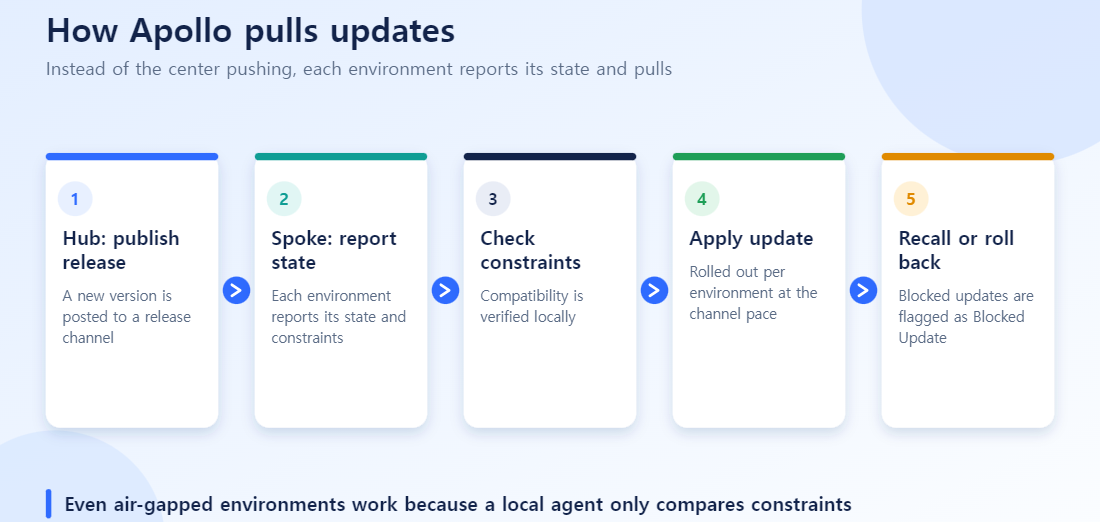
- Hub: The central repository holding product definitions, deployment settings, security/governance policies, and release promotion rules.
- Spoke: The actual target environments where software runs (Kubernetes clusters, edge hardware, and so on). Each Spoke runs a local orchestration agent that reports status back to the Hub.
The key design decision here is that Apollo is pull-based, not push-based.[3] Instead of a central system pushing out “deploy now” the way traditional CI/CD does, each Spoke’s local agent continuously checks the current environment state against constraints — schema versions, inter-service dependencies — and requests and applies upgrades on its own once conditions are met. A single Hub can manage multiple Spokes, and a Hub can even manage itself.
Release Channels — Not Every Environment Updates at the Same Pace
Apollo doesn’t push a release to everything at once. Instead, releases are promoted through stages called Release Channels.[4] Product teams define the promotion criteria between channels, and each environment subscribes to the channel that matches its stability requirements — test clusters typically subscribe to an earlier channel, production clusters to one that’s already been validated.
Promotion isn’t scheduled on a fixed timeline — it’s driven by whether constraints are satisfied.[1][4]
- Are inter-service and schema dependency requirements met?
- Has the release passed its defined soak-time and health-check/SLO thresholds?
- Does it fit the environment’s maintenance window and compliance approval rules?
Apollo also integrates with monitoring tools (Prometheus, Datadog, etc.) so that if real error rates cross a threshold, promotion can automatically pause or the deployment can be blocked outright.[1]
What Happens When Something Goes Wrong? Recalls and Rollbacks
The most important question for any automated deployment system is: how do you undo a bad release? Apollo handles this through a process called a Recall.[5]
A recall can be triggered three ways:
- Manually, by an engineer
- Automatically, through continuous vulnerability scanning (CVE detection) and similar checks
- Programmatically, via an API call from an external service
Once a recall fires, Apollo halts further propagation of that release and remediates affected environments using one of several roll-off strategies.[6]
- Roll Forward: Upgrade to a newer, non-recalled release that satisfies all constraints
- Allow Downgrade (Rollback): If rolling forward isn’t possible, revert to a known-good earlier release at or above a specified minimum version
- Freeze All Version Changes: Hold the environment on its current release until a specified expiration date or a manual override
- Test Roll-off on Specific Environments: Apply the roll-off/rollback to designated test environments first, before rolling it out fleet-wide
The simple fact that “recall” and “roll-off strategy” exist as official, named procedures tells you something important: automatically-deployed releases do sometimes cause real problems, and Palantir designed the system around that assumption.
Sometimes an Automatic Update Just… Doesn’t Happen: “Blocked Update”
Apollo’s documentation also spells out a concrete case where automatic updates fail outright. For example, if a new Module version adds a new variable with no default value, Apollo can’t automatically update that installation — it marks it as a “Blocked Update” and shows the reason why.[7] When this happens, someone with environment-editor permissions has to either fix the module definition to resolve the backward-compatibility issue, or update the installation manually.
This isn’t something Palantir hides — it’s documented, expected behavior. It also means the automation isn’t trying to silently handle every case: it’s designed to detect the cases it can’t handle and hand them back to a human.
Everything From Here Is My Own Opinion
Everything above was based on official documentation. From here, this is my personal take, formed from working with autonomous deployment systems like Apollo in practice.
What’s genuinely good about this: staying continuously current on patches and new capabilities is a real advantage. Nobody has to manually track versions or schedule upgrade windows, and the recall mechanism means security vulnerabilities can be addressed quickly.
Where it gets complicated: because all of this runs automatically, something that worked fine yesterday can just stop working today. A “Blocked Update” like the one above — where the system stops itself and tells you why — is the good case. The harder case is when behavior quietly changes underneath you, and it takes real time to figure out why.
And in that moment, I’ve found it’s hard to expect the kind of fast, hands-on, in-person response you might get from a domestic vendor. That’s not a statement that Palantir’s support is bad — it’s more that a global SaaS vendor’s support model is simply designed differently from the “we’ll send someone over right away” approach common among local system integrators and solution vendors. There’s a real trade-off between the benefits you get from automation and the responsiveness of having a person immediately available when something breaks — and I think that’s the realistic way to look at it.
Pull-Based CD vs. Traditional Push CD
| Aspect | Traditional push CD (Jenkins, GitLab CI, etc.) | Apollo (pull-based) |
|---|---|---|
| Deployment trigger | A central pipeline delivers to each environment | Each Spoke checks its own state and requests the update |
| Air-gapped environments | Deployment fails if the network link is cut | A local agent only needs to check constraints, so it works |
| Environment-specific state | The center must track every environment | Each Spoke reports its own state |
| Timing control | Applied together on a central schedule | Applied per environment when constraints are met |
What to Check Before an Update
- Is release promotion staged? Rather than applying to every Spoke at once, set rules in the Hub so releases promote from test, to some production, to all.
- Are you subscribed to dependency-change notices? If an update changes behavior, know which channel gives advance notice.
- Have you rehearsed rollback? Try the procedure for returning to the previous version once, before you need it.
Summary
- Apollo is a pull-based CD platform that automatically deploys and manages Palantir software across multiple environments.
- The Hub holds policy; each Spoke checks its own conditions and pulls upgrades on its own.
- Release channels and constraint-based promotion mean not every environment updates at the same pace.
- The existence of an official recall/roll-off process means Palantir’s own design assumes automated deployment can fail.
- (Personal opinion) Staying continuously current is a real benefit — but it comes bundled with unexpected changes from automation, and comparatively slower hands-on support.
References
[1] Palantir, Introduction • Apollo, official Apollo documentation.
[2] Palantir Blog, Palantir Apollo: Powering SaaS where no SaaS has gone before, official Palantir blog.
[3] Palantir, Apollo • Getting Started, official Apollo documentation.
[4] Palantir, Overview • Core • Apollo, official Apollo documentation.
[5] Palantir, Recalling Releases • Overview, official Apollo documentation.
[6] Palantir, Recalling Releases • Roll-off strategies, official Apollo documentation.
[7] Palantir, Managing Modules • Update a Module installation, official Apollo documentation.