
Summary
Palantir Foundry is a platform built on a five-layer architecture: Connect → Pipeline → Ontology → Applications → AI. Source-system data is connected, run through cleaning pipelines, structured into an ontology, and then surfaced through applications like Workshop and AIP’s AI features. Unlike a traditional BI/ETL stack, the key difference is that all five layers stay continuously connected inside one platform.
Who this is for
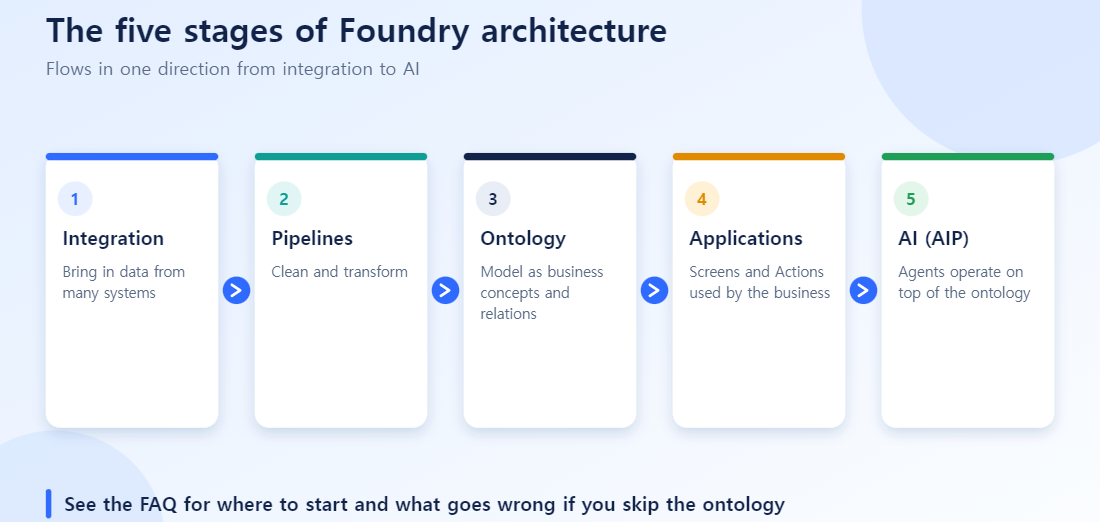
Foundry has quite a few applications, and it’s easy to not know where to start. Reading about each application in isolation, you can lose track of where each tool sits in the bigger picture. This piece maps the order data actually travels through Foundry — from entering the organization to showing up on a real screen — and which tool handles each step.
The full flow: Connect → Pipeline → Ontology → Applications → AI
Foundry’s applications aren’t just a flat list — they stack in this order:
| Layer | What it does | Related applications |
|---|---|---|
| 1. Connect | Bring in data from source systems (ERP, databases, files) | Data Connections |
| 2. Pipeline (Transform) | Clean and reshape raw data into usable form | Pipeline Builder, Code Repository |
| 3. Ontology (Model) | Map cleaned data into business terms (Object/Link/Action Type) | Ontology Manager |
| 4. Applications (Use) | Turn the ontology into screens, analysis, and dashboards people can use | Workshop, Contour, Quiver, Object Explorer, Insights |
| 5. AI (Automate) | Let AI read, decide, and act on top of the ontology | AIP (Logic, Assist, Chatbot Studio, Analyst, AI FDE), OMCP |
How is this different from a traditional BI/ETL architecture?
Traditional data warehouse architecture usually follows a three-layer structure: ETL → warehouse → BI dashboard. Compared to Foundry’s five layers:
| Traditional ETL/BI | Foundry | |
|---|---|---|
| When cleaning happens | Cleaned before loading (ETL) | Loaded raw first, cleaned after (closer to ELT) |
| Data model | Table- and join-centric | Object-, relationship-, and action-centric (ontology) |
| Final output | Dashboard (read-only) | Dashboard + executable applications (Action) |
| Integration with AI | Requires building a separate data pipeline again | The ontology already exists as a structure AI can reference |
The biggest difference is layers 4 (Applications) and 5 (AI). A traditional architecture stops at showing a dashboard. Foundry lets you change data directly from a screen through the ontology (Action), or let AI read and act on that same ontology.
What each layer feels like in practice
Connect and Pipeline
The most common mistake is “connect everything now, clean it up later.” If you don’t clean the data before moving to the ontology layer, that mess transfers straight into your ontology design. This is also the layer responsible for making lineage traceable with Data Lineage — knowing which source everything came from.
Ontology
This is where you have to model in business terms, not technical jargon. Get this layer wrong and both layer 4 (Applications) and layer 5 (AI) become shaky. The ontology acts as a “translator” between the pipeline and the applications — if that translation is inaccurate, no amount of good screen design or AI on top of it will produce results that match actual business meaning.
Applications
Which tool you use depends on purpose. Workshop is for when people need to directly operate a screen. Contour and Quiver are for point-and-click analysis and dashboards. Object Explorer is for when you just need to browse data. The same principle applies here as everywhere: “what is it for” determines the tool.
AI
This only works well if the ontology is already solid. AIP’s various tools (Logic, Assist, Chatbot Studio, Analyst) really just differ in how they read and write the ontology built in layer 3. Recently, OMCP (Ontology MCP) has let external AI agents like Claude connect directly to this ontology too — meaning the boundary of the “AI layer” is expanding from inside Foundry to outside it.
Where to start
If your organization is adopting Foundry for the first time, the important thing is not trying to build all five layers at once. The recommended order in practice:
- Connect and clean just one piece of your most frequently used data first. Trying to connect your entire system landscape will exhaust you before you even reach ontology design.
- Build one small ontology with that data first. Starting with one or two Object Types and one or two Links is enough.
- Attach one screen (Workshop) or one analysis (Contour) and actually use it. This step is where ontology design problems usually surface.
- Only move to the AI layer after refining the ontology based on what you learned. If you attach AI while the ontology is still unstable, it becomes hard to tell whether a wrong answer is a model problem or a data problem.
Failure patterns that keep showing up
- Trying to build all five layers at once. Scoping a project from Connect all the way to AI in one go makes it hard to isolate where a problem came from, no matter which layer it surfaces in. It’s safer to validate small at each layer and expand outward.
- Treating the ontology layer as an extension of the pipeline. Treating ontology design like “the last step of data cleaning” tends to leave technical jargon baked into the ontology. Ontology design needs a different lens entirely — business terms, relationships, actions — as its own separate design task, not a pipeline afterthought.
- Misdiagnosing AI-layer problems as AI problems. When AI gives a strange answer, the real cause is often a poorly described Property or a wrongly defined relationship in the ontology. When something looks off at the AI layer, get in the habit of going back to check layer 3 (Ontology) first.
Wrapping up
The sheer number of Foundry application names is confusing at first. But it all eventually fits into one line: Connect → Pipeline → Ontology → Applications → AI.
FAQ
Q. How is Foundry different from existing BI/ETL tools?
Traditional BI/ETL stacks have separate connect, transform, and visualize tools, so data tends to lose meaning as it passes through multiple systems. Foundry keeps everything connected — from connect through ontology, applications, and AI — inside one platform while preserving lineage.
Q. Which of the five layers should I tackle first?
Connect (getting source data) and Pipeline (cleaning) need to come first, with the ontology built on top of that. The ontology layer is what lets multiple applications and AI reuse the same data.
Q. Can I skip the ontology layer and build applications directly?
You can, but it’s not recommended. Building applications without an ontology means each app has to independently reinterpret pipeline output, which tends to break consistency.
Q. Where does the AI (AIP) layer connect?
AIP operates on top of the ontology. Features like AIP Assist, Logic, and Chatbot Studio use the objects, relationships, and actions the ontology defines as context to produce accurate answers.
Q. How long does it take to adopt this architecture?
It depends on organization size and how clean your existing data is, but a narrow pilot (a single process) can often go through all five layers within a few weeks. Enterprise-wide rollout needs its own separate roadmap.